> ## Documentation Index
> Fetch the complete documentation index at: https://docs.idun-group.com/llms.txt
> Use this file to discover all available pages before exploring further.
# Guardrails
> Protect your agents with 15 built-in guardrails for PII detection, jailbreak prevention, toxic language filtering, topic restriction, and more.
Guardrails scan agent inputs and outputs to enforce safety and policy boundaries. Idun Engine provides 15 built-in guardrail types powered by [Guardrails AI](https://guardrailsai.com), applied at the input position, output position, or both.
## How guardrails work
Guardrails run at two positions in the agent request lifecycle:
* **Input guardrails** validate user messages before the agent processes them. If any input guardrail fails, the request is blocked immediately and the agent never sees the message.
* **Output guardrails** validate agent responses before returning them to the user. They run after agent processing completes. Output guardrails add latency to the response time.
You can configure multiple guardrails at each position. All guardrails at a given position are checked, and any single failure blocks the request or response.
## Configuration
Add guardrails in the `guardrails` section of your `config.yaml`. Each guardrail has a `config_id` that identifies the type and parameters specific to that type.
```yaml config.yaml theme={"theme":{"light":"github-light","dark":"github-dark"}}
guardrails:
input:
- config_id: "ban_list"
banned_words: ["spam", "scam", "phishing"]
- config_id: "detect_pii"
pii_entities: ["EMAIL_ADDRESS", "PHONE_NUMBER", "CREDIT_CARD_NUMBER"]
- config_id: "detect_jailbreak"
threshold: 0.8
output:
- config_id: "toxic_language"
threshold: 0.7
- config_id: "gibberish_text"
threshold: 0.8
```
Infrastructure fields (`api_key`, `guard_url`, `reject_message`) are populated automatically. For YAML-based configs the `api_key` is read from the `GUARDRAILS_API_KEY` environment variable. You only need to specify the `config_id` and guard-specific parameters.
Navigate to `/admin/guardrails/` in the running standalone. The catalog at the top groups guards by category; configured guards are listed below.
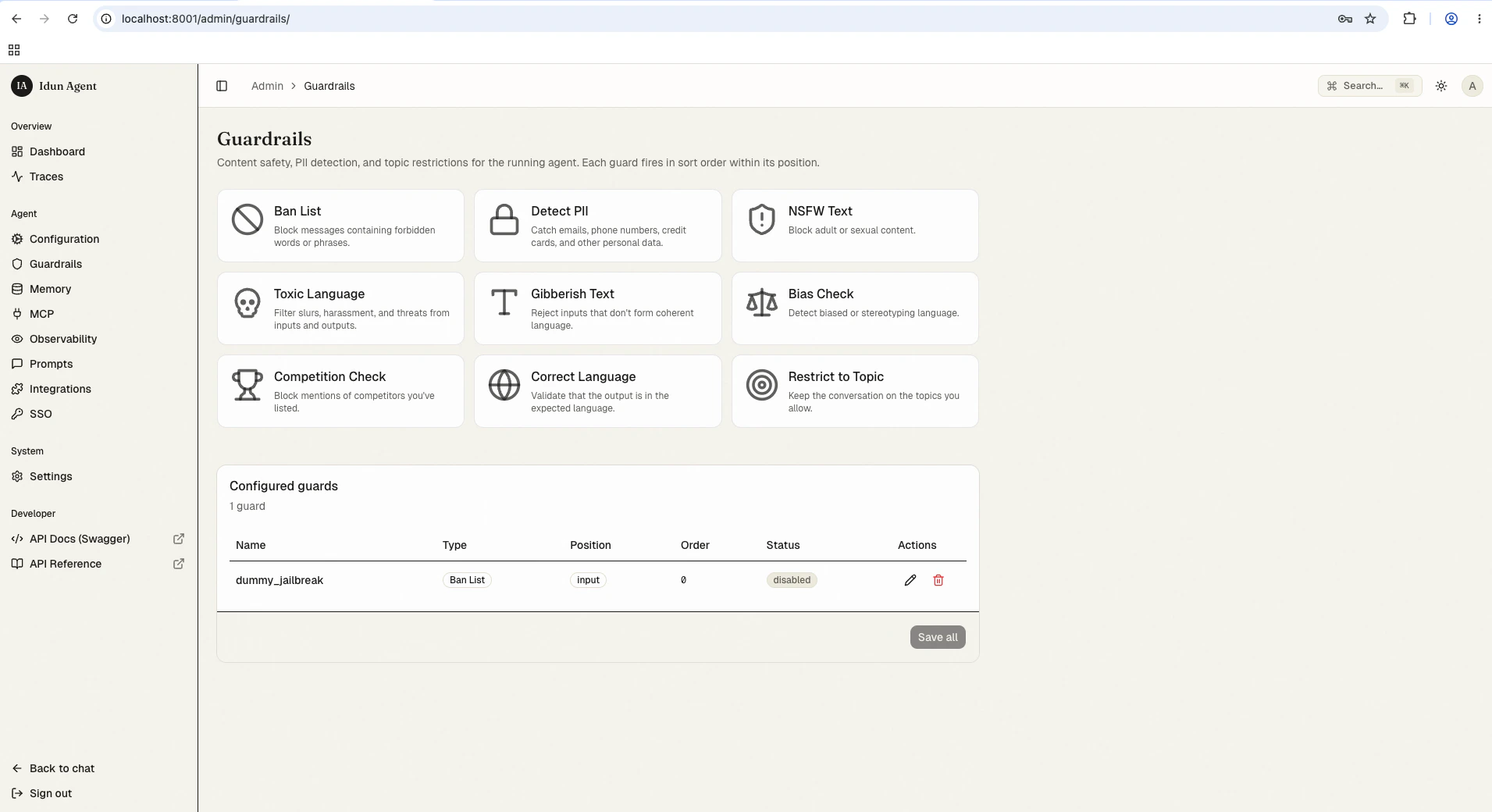 Click the guard type you want (e.g., Ban List, Detect PII, Toxic Language). Fill in the configuration form, including the **Guardrails AI API key** field on the first guard you create. Get a key from [hub.guardrailsai.com](https://hub.guardrailsai.com). The key is persisted in the guardrail row and re-hydrated into the process environment on every boot, so you only enter it once.
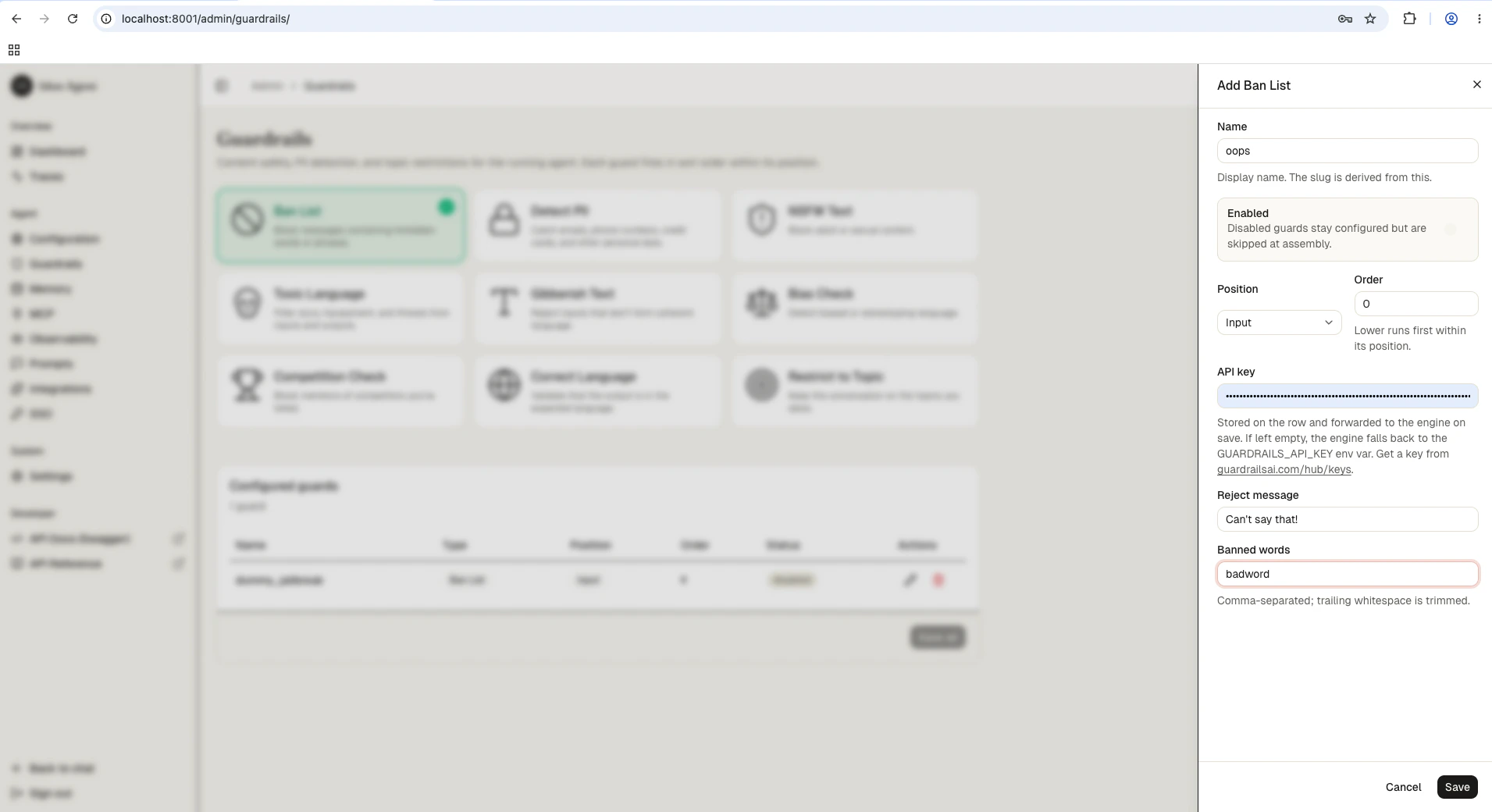 Save the form. The reload pipeline validates the new config, re-instantiates the engine, and the guard is live. A bad save rolls back without disturbing the running agent.
Some guards are marked "Soon" and not yet available: Code Scanner, Jailbreak, Prompt Injection, Model Armor, Custom LLM, and RAG Hallucination.
Guardrails need a Guardrails AI API key. Either set it once in the admin form on your first guardrail (the standalone persists and re-hydrates it on boot), or export it as `GUARDRAILS_API_KEY` in your environment. Get a key from [Guardrails AI](https://guardrailsai.com).
## Available guardrail types
All 15 guardrail types and their key parameters:
| `config_id` | Description | Key parameters |
| ------------------- | ----------------------------------------------------------------------------- | ----------------------------------------------------- |
| `ban_list` | Block specific words or phrases | `banned_words` (list of strings) |
| `detect_pii` | Detect personally identifiable information (emails, phone numbers, addresses) | `pii_entities` (list of PII types) |
| `nsfw_text` | Block sexually explicit or violent content | `threshold` (0.0 to 1.0) |
| `toxic_language` | Detect toxic or offensive language | `threshold` (0.0 to 1.0) |
| `detect_jailbreak` | Identify attempts to bypass safety guidelines | `threshold` (0.0 to 1.0) |
| `prompt_injection` | Detect prompt injection attacks | `threshold` (0.0 to 1.0) |
| `competition_check` | Block mentions of competitor names or products | `competitors` (list of strings) |
| `bias_check` | Detect biased language | `threshold` (0.0 to 1.0) |
| `correct_language` | Verify text is written in expected languages | `expected_languages` (ISO codes, e.g. `["en", "fr"]`) |
| `restrict_to_topic` | Keep conversation within defined subject areas | `topics` (list of allowed topics) |
| `gibberish_text` | Filter nonsensical or incoherent output | `threshold` (0.0 to 1.0) |
| `rag_hallucination` | Detect hallucinated content in RAG responses | `threshold` (0.0 to 1.0) |
| `code_scanner` | Validate code blocks for allowed programming languages | `allowed_languages` (list of language names) |
| `model_armor` | Google Cloud Model Armor integration | `project_id`, `location`, `template_id` |
| `custom_llm` | Define custom validation rules using an LLM | `model`, `prompt` |
## Adding guardrails through config file
For first-boot seeding (or engine-only mode), add guardrails directly to your `config.yaml`:
```yaml config.yaml theme={"theme":{"light":"github-light","dark":"github-dark"}}
guardrails:
input:
- config_id: "ban_list"
banned_words: ["competitor-product", "internal-codename"]
- config_id: "detect_pii"
pii_entities: ["EMAIL_ADDRESS", "PHONE_NUMBER"]
```
```yaml config.yaml theme={"theme":{"light":"github-light","dark":"github-dark"}}
guardrails:
output:
- config_id: "toxic_language"
threshold: 0.7
- config_id: "gibberish_text"
threshold: 0.8
```
```yaml config.yaml theme={"theme":{"light":"github-light","dark":"github-dark"}}
guardrails:
input:
- config_id: "detect_jailbreak"
threshold: 0.8
- config_id: "prompt_injection"
threshold: 0.8
output:
- config_id: "rag_hallucination"
threshold: 0.7
```
Each guardrail entry supports an optional `reject_message` field to customize the error message returned when the guardrail triggers:
```yaml theme={"theme":{"light":"github-light","dark":"github-dark"}}
guardrails:
input:
- config_id: "ban_list"
banned_words: ["blocked-term"]
reject_message: "Your message contains a restricted term."
```
## Testing guardrails
After configuring guardrails, verify they work as expected by sending test requests through the API.
```bash Test input guardrail (PII) theme={"theme":{"light":"github-light","dark":"github-dark"}}
curl -X POST http://localhost:8008/v1/agents/{agent_id}/query \
-H "Content-Type: application/json" \
-H "Authorization: Bearer {api_key}" \
-d '{"message": "My email is john.doe@example.com and phone is 555-0123"}'
```
```bash Test with safe input theme={"theme":{"light":"github-light","dark":"github-dark"}}
curl -X POST http://localhost:8008/v1/agents/{agent_id}/query \
-H "Content-Type: application/json" \
-H "Authorization: Bearer {api_key}" \
-d '{"message": "What is the weather like today?"}'
```
When a guardrail blocks a request, the response includes the `guardrail` field identifying which guard triggered and a `detail` message explaining why.
## Best practices
* **Layer multiple guardrails** at the input position for defense in depth. Combine ban lists with PII detection and jailbreak prevention.
* **Use output guardrails sparingly** since they add latency. Reserve them for critical checks like hallucination detection or gibberish filtering.
* **Set thresholds conservatively** at first (higher values = stricter), then lower them if you see too many false positives.
* **Test with realistic inputs** before production. Send messages that should trigger each guardrail and verify legitimate content passes through.
## Next steps
All 15 guardrail types and their configuration fields.
Monitor guardrail activity in traces.
Deploy your agent to Cloud Run, a VM, or your laptop.
Save the form. The reload pipeline validates the new config, re-instantiates the engine, and the guard is live. A bad save rolls back without disturbing the running agent.
Some guards are marked "Soon" and not yet available: Code Scanner, Jailbreak, Prompt Injection, Model Armor, Custom LLM, and RAG Hallucination.
Guardrails need a Guardrails AI API key. Either set it once in the admin form on your first guardrail (the standalone persists and re-hydrates it on boot), or export it as `GUARDRAILS_API_KEY` in your environment. Get a key from [Guardrails AI](https://guardrailsai.com).
## Available guardrail types
All 15 guardrail types and their key parameters:
| `config_id` | Description | Key parameters |
| ------------------- | ----------------------------------------------------------------------------- | ----------------------------------------------------- |
| `ban_list` | Block specific words or phrases | `banned_words` (list of strings) |
| `detect_pii` | Detect personally identifiable information (emails, phone numbers, addresses) | `pii_entities` (list of PII types) |
| `nsfw_text` | Block sexually explicit or violent content | `threshold` (0.0 to 1.0) |
| `toxic_language` | Detect toxic or offensive language | `threshold` (0.0 to 1.0) |
| `detect_jailbreak` | Identify attempts to bypass safety guidelines | `threshold` (0.0 to 1.0) |
| `prompt_injection` | Detect prompt injection attacks | `threshold` (0.0 to 1.0) |
| `competition_check` | Block mentions of competitor names or products | `competitors` (list of strings) |
| `bias_check` | Detect biased language | `threshold` (0.0 to 1.0) |
| `correct_language` | Verify text is written in expected languages | `expected_languages` (ISO codes, e.g. `["en", "fr"]`) |
| `restrict_to_topic` | Keep conversation within defined subject areas | `topics` (list of allowed topics) |
| `gibberish_text` | Filter nonsensical or incoherent output | `threshold` (0.0 to 1.0) |
| `rag_hallucination` | Detect hallucinated content in RAG responses | `threshold` (0.0 to 1.0) |
| `code_scanner` | Validate code blocks for allowed programming languages | `allowed_languages` (list of language names) |
| `model_armor` | Google Cloud Model Armor integration | `project_id`, `location`, `template_id` |
| `custom_llm` | Define custom validation rules using an LLM | `model`, `prompt` |
## Adding guardrails through config file
For first-boot seeding (or engine-only mode), add guardrails directly to your `config.yaml`:
```yaml config.yaml theme={"theme":{"light":"github-light","dark":"github-dark"}}
guardrails:
input:
- config_id: "ban_list"
banned_words: ["competitor-product", "internal-codename"]
- config_id: "detect_pii"
pii_entities: ["EMAIL_ADDRESS", "PHONE_NUMBER"]
```
```yaml config.yaml theme={"theme":{"light":"github-light","dark":"github-dark"}}
guardrails:
output:
- config_id: "toxic_language"
threshold: 0.7
- config_id: "gibberish_text"
threshold: 0.8
```
```yaml config.yaml theme={"theme":{"light":"github-light","dark":"github-dark"}}
guardrails:
input:
- config_id: "detect_jailbreak"
threshold: 0.8
- config_id: "prompt_injection"
threshold: 0.8
output:
- config_id: "rag_hallucination"
threshold: 0.7
```
Each guardrail entry supports an optional `reject_message` field to customize the error message returned when the guardrail triggers:
```yaml theme={"theme":{"light":"github-light","dark":"github-dark"}}
guardrails:
input:
- config_id: "ban_list"
banned_words: ["blocked-term"]
reject_message: "Your message contains a restricted term."
```
## Testing guardrails
After configuring guardrails, verify they work as expected by sending test requests through the API.
```bash Test input guardrail (PII) theme={"theme":{"light":"github-light","dark":"github-dark"}}
curl -X POST http://localhost:8008/v1/agents/{agent_id}/query \
-H "Content-Type: application/json" \
-H "Authorization: Bearer {api_key}" \
-d '{"message": "My email is john.doe@example.com and phone is 555-0123"}'
```
```bash Test with safe input theme={"theme":{"light":"github-light","dark":"github-dark"}}
curl -X POST http://localhost:8008/v1/agents/{agent_id}/query \
-H "Content-Type: application/json" \
-H "Authorization: Bearer {api_key}" \
-d '{"message": "What is the weather like today?"}'
```
When a guardrail blocks a request, the response includes the `guardrail` field identifying which guard triggered and a `detail` message explaining why.
## Best practices
* **Layer multiple guardrails** at the input position for defense in depth. Combine ban lists with PII detection and jailbreak prevention.
* **Use output guardrails sparingly** since they add latency. Reserve them for critical checks like hallucination detection or gibberish filtering.
* **Set thresholds conservatively** at first (higher values = stricter), then lower them if you see too many false positives.
* **Test with realistic inputs** before production. Send messages that should trigger each guardrail and verify legitimate content passes through.
## Next steps
All 15 guardrail types and their configuration fields.
Monitor guardrail activity in traces.
Deploy your agent to Cloud Run, a VM, or your laptop.