> ## Documentation Index
> Fetch the complete documentation index at: https://docs.idun-group.com/llms.txt
> Use this file to discover all available pages before exploring further.
# How easy it is to use Idun Engine with any Deep Agent
> Wrap LangChain's Deep Agents framework in a production FastAPI service in minutes. Discover your agent through the Idun wizard, chat with it, get built-in dashboards and traces, plug in Langfuse on top, then add a Google Workspace MCP to send email — all without touching the engine code.
[Deep Agents](https://docs.langchain.com/oss/python/deepagents/overview) is LangChain's framework for agents that plan, write to a virtual filesystem, and spawn subagents. Under the hood, it produces a compiled LangGraph `StateGraph` — which means **the Idun Engine treats it exactly like any other LangGraph agent**. No adapter, no glue code: point Idun at the module, get a streaming API, a chat UI, observability, and MCP tools for free.
This guide takes the official [text-to-SQL Deep Agent example](https://github.com/langchain-ai/deepagents/tree/main/examples/text-to-sql-agent), drops it behind Idun, and walks all the way to a Gemini-powered agent that queries SQLite, traces every step in the built-in dashboard and Langfuse, and emails its results via a Google Workspace MCP server.
## What you will build
Clone the Deep Agents example, run `idun init`, point the wizard at `agent.py`.
Ask natural-language questions, watch the planning + SQL tool calls stream live.
Switch the LangGraph checkpointer to SQLite — full chat history with one click.
Use the built-in dashboard and trace viewer, then plug Langfuse on top.
Connect Gmail / Drive / Calendar through MCP and have the agent email the results.
## Prerequisites
* Python 3.12+
* A Gemini API key — [get one](https://aistudio.google.com/apikey)
* (Step 7) A free [Langfuse Cloud](https://cloud.langfuse.com) account
* (Step 8) A Google Cloud project with a Desktop OAuth client and Gmail API enabled
We'll work from the official `text-to-sql-agent` example. It ships with the Chinook SQLite database and a few skills (`query-writing`, `schema-exploration`):
```bash theme={"theme":{"light":"github-light","dark":"github-dark"}}
git clone https://github.com/langchain-ai/deepagents.git
cd deepagents/examples/text-to-sql-agent
# Download the demo database
curl -L -o chinook.db \
https://github.com/lerocha/chinook-database/raw/master/ChinookDatabase/DataSources/Chinook_Sqlite.sqlite
```
The interesting bit of `agent.py` is the very last line:
```python agent.py theme={"theme":{"light":"github-light","dark":"github-dark"}}
agent = create_sql_deep_agent()
```
`create_deep_agent(...)` returns a compiled `CompiledStateGraph`. Idun's LangGraph adapter accepts both compiled graphs and raw `StateGraph` builders, so this Just Works — no rewrite needed.
Install the engine and the standalone runtime alongside the example's dependencies:
```bash theme={"theme":{"light":"github-light","dark":"github-dark"}}
uv venv --python 3.12
source .venv/bin/activate
uv pip install -e .
uv pip install idun-agent-engine idun-agent-standalone langchain-google-genai
```
Create `.env` from the template the repo ships:
```bash theme={"theme":{"light":"github-light","dark":"github-dark"}}
cp .env.example .env
```
```bash .env theme={"theme":{"light":"github-light","dark":"github-dark"}}
# Idun standalone
IDUN_CONFIG_PATH=./config.yaml
IDUN_AGENT_CONFIG_PATH=./config.yaml
IDUN_ALLOW_OPEN_ADMIN=1
IDUN_ADMIN_AUTH_MODE=password
IDUN_ADMIN_PASSWORD_HASH=${IDUN_ADMIN_PASSWORD_HASH} # paste the output of `idun hash-password`
IDUN_SESSION_SECRET=${IDUN_SESSION_SECRET} # paste the output of `openssl rand -hex 32`
# LLM
GEMINI_API_KEY=${GEMINI_API_KEY} # export your real Gemini API key in your shell
```
Generate the two secrets:
```bash theme={"theme":{"light":"github-light","dark":"github-dark"}}
idun hash-password # prompts, prints a bcrypt hash → IDUN_ADMIN_PASSWORD_HASH
openssl rand -hex 32 # → IDUN_SESSION_SECRET
```
`IDUN_ALLOW_OPEN_ADMIN=1` lets you reach `/admin/*` without an auth gate while you explore locally. Turn it off (or remove it) before exposing the service.
You don't need to write `config.yaml` yourself. `idun init` boots the standalone server, opens your browser, and — since no agent is configured yet — routes you to the onboarding wizard.
```bash theme={"theme":{"light":"github-light","dark":"github-dark"}}
idun init
```
What happens on first run:
1. Alembic migrations create the standalone DB.
2. The server starts on `http://localhost:8000`.
3. Your browser opens the **discover** wizard.
The wizard asks two things:
* **Framework** — pick `LangGraph`. Deep Agents compile to a `StateGraph`, so the LangGraph adapter handles them.
* **Graph definition** — point Idun at the compiled graph: `agent.py:agent`. Format is `path/to/file.py:variable`.
That's the entire setup. No FastAPI route, no streaming protocol, no thread-id wiring. Click through and the engine boots with your agent attached.
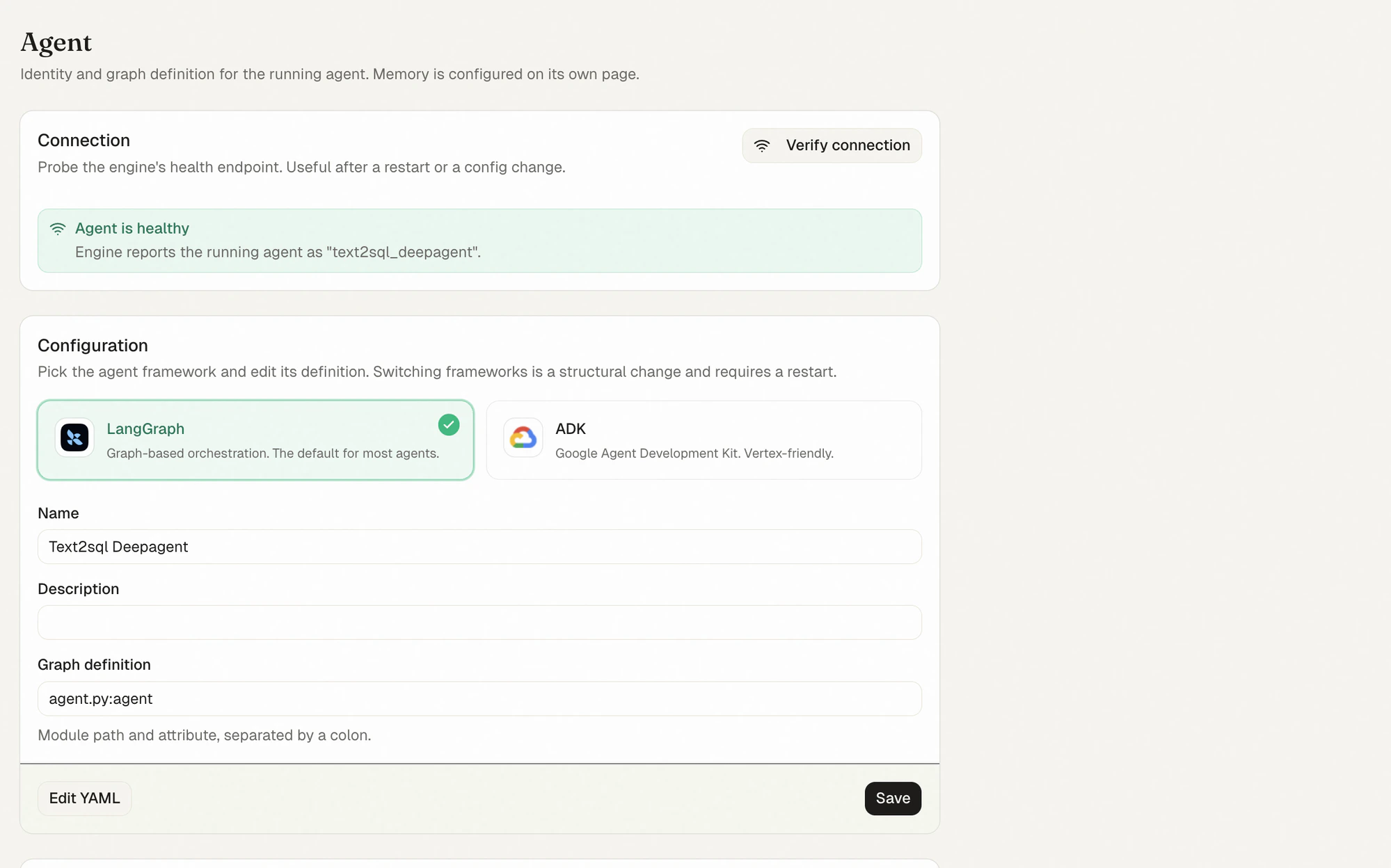
Once the wizard finishes you land in the admin **Agent** page. The connection probe confirms the engine reports your agent as `text2sql_deepagent`; the configuration card shows the framework (LangGraph), the agent name, and the `agent.py:agent` graph reference.
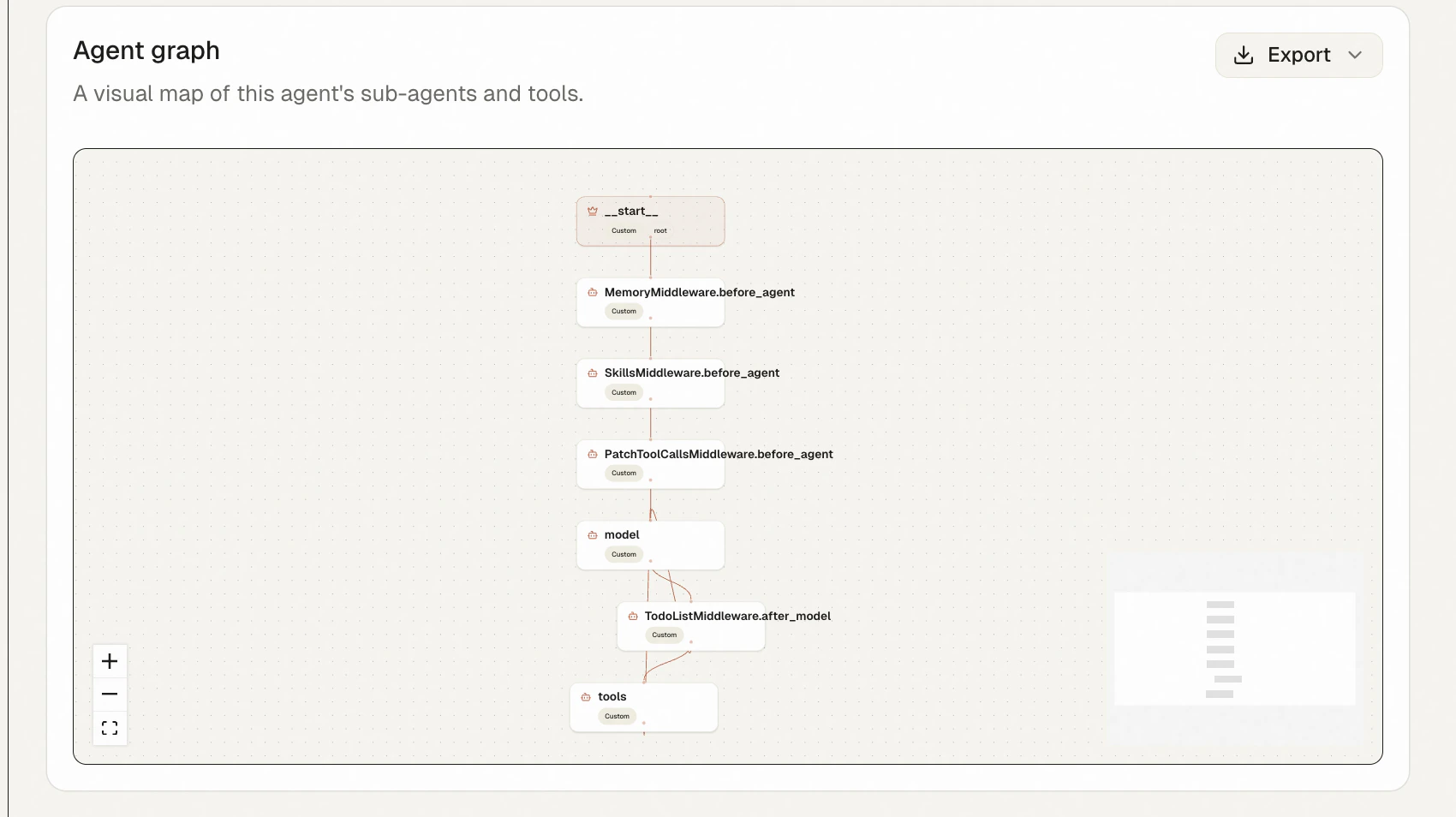
 Scroll down for the **Agent graph** card. Idun introspects the compiled graph and renders the Deep Agent's actual node structure — the `MemoryMiddleware`, `SkillsMiddleware`, and `PatchToolCallsMiddleware` `before_agent` hooks, the `model` node, the `TodoListMiddleware.after_model` post-hook, and the `tools` node. This is the Deep Agents runtime, made visible.
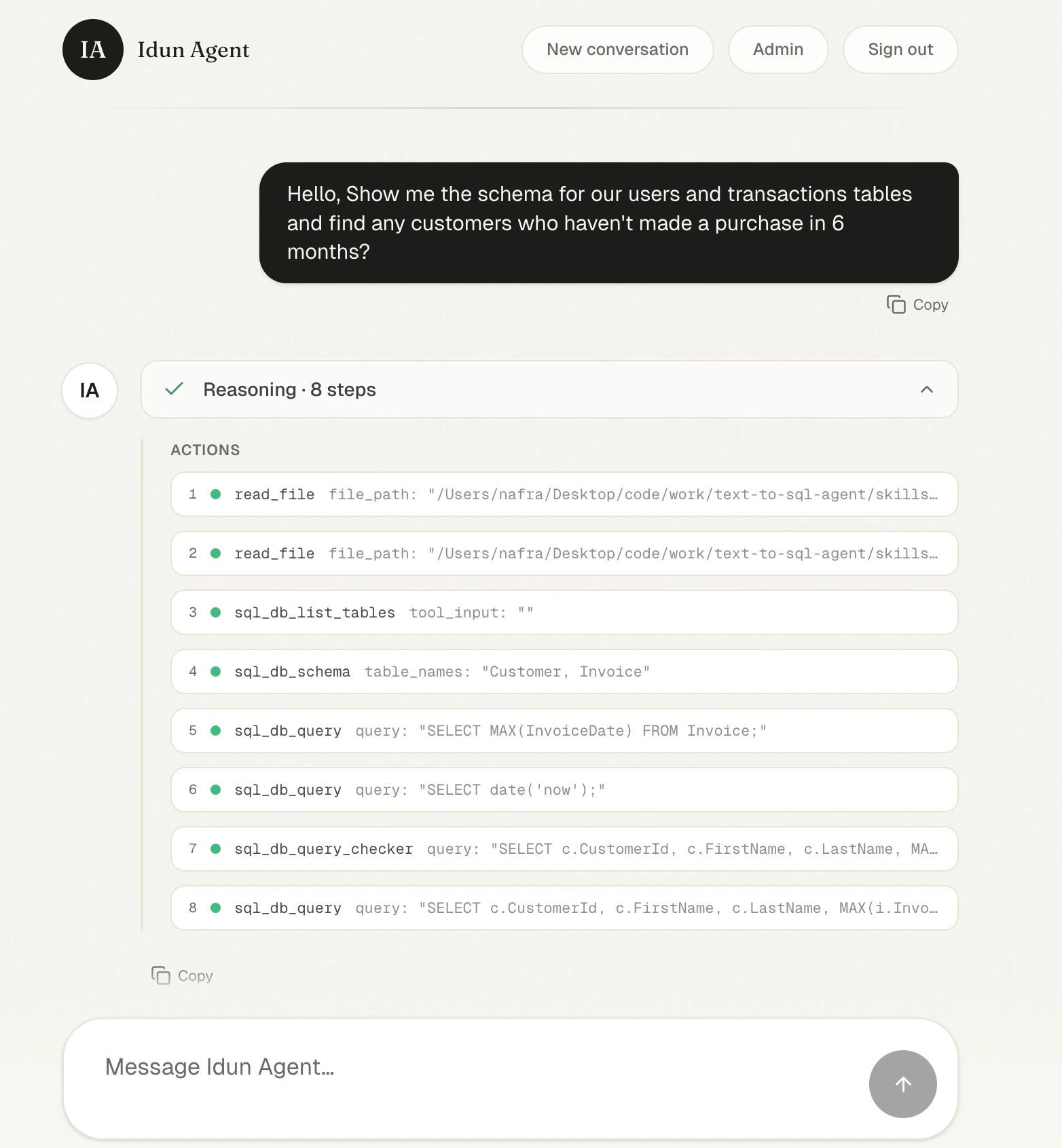
 Open `http://localhost:8000/` and ask something the agent has to plan for:
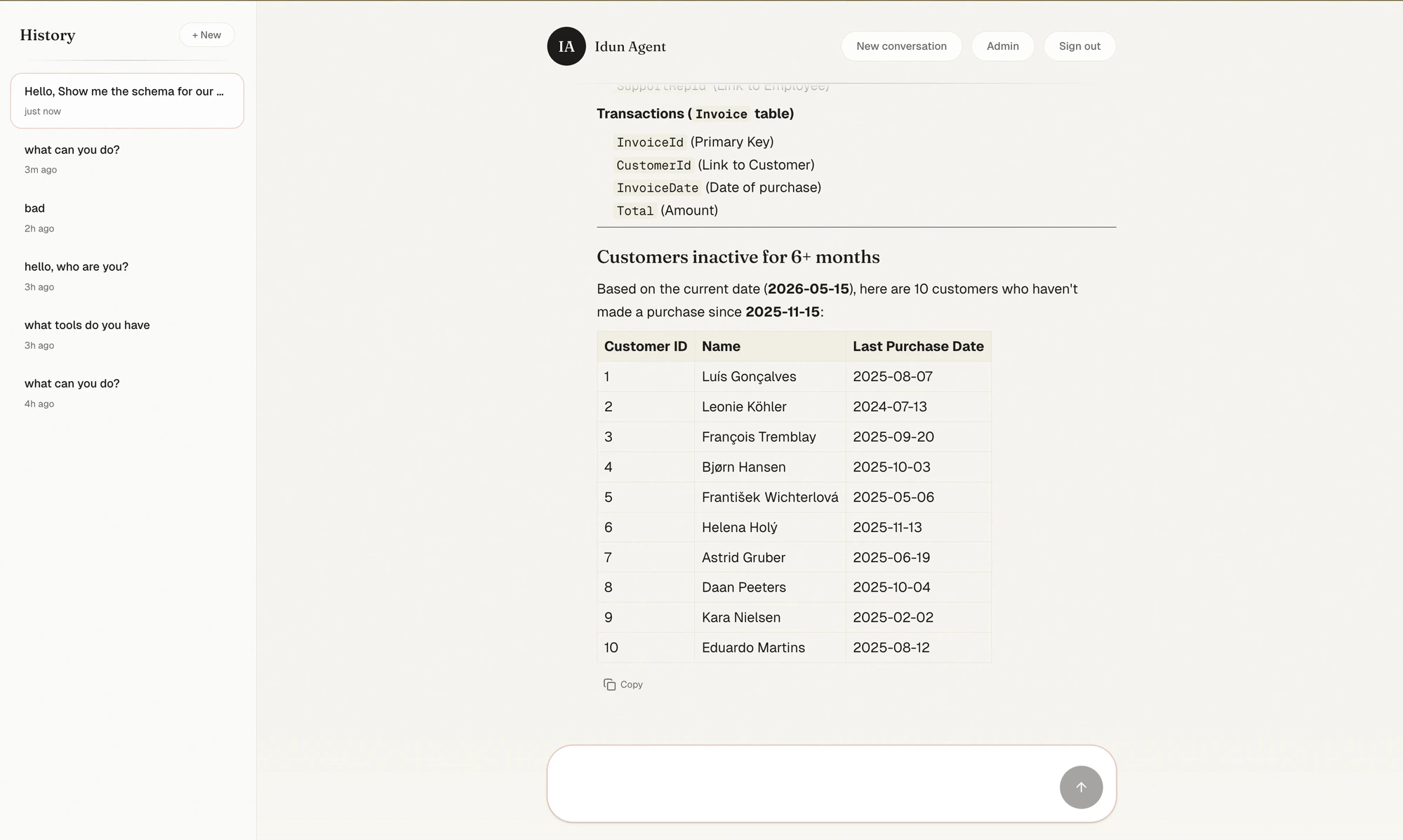
> Hello, show me the schema for our users and transactions tables and find any customers who haven't made a purchase in 6 months.
The chat collapses the agent's planning into a **Reasoning** card. Expand it and you see exactly what the Deep Agent did: it loaded its skills via `read_file`, listed the SQL tables, fetched the `Customer` and `Invoice` schemas, sanity-checked the date, ran the query through `sql_db_query_checker`, and finally executed the result.
Open `http://localhost:8000/` and ask something the agent has to plan for:
> Hello, show me the schema for our users and transactions tables and find any customers who haven't made a purchase in 6 months.
The chat collapses the agent's planning into a **Reasoning** card. Expand it and you see exactly what the Deep Agent did: it loaded its skills via `read_file`, listed the SQL tables, fetched the `Customer` and `Invoice` schemas, sanity-checked the date, ran the query through `sql_db_query_checker`, and finally executed the result.
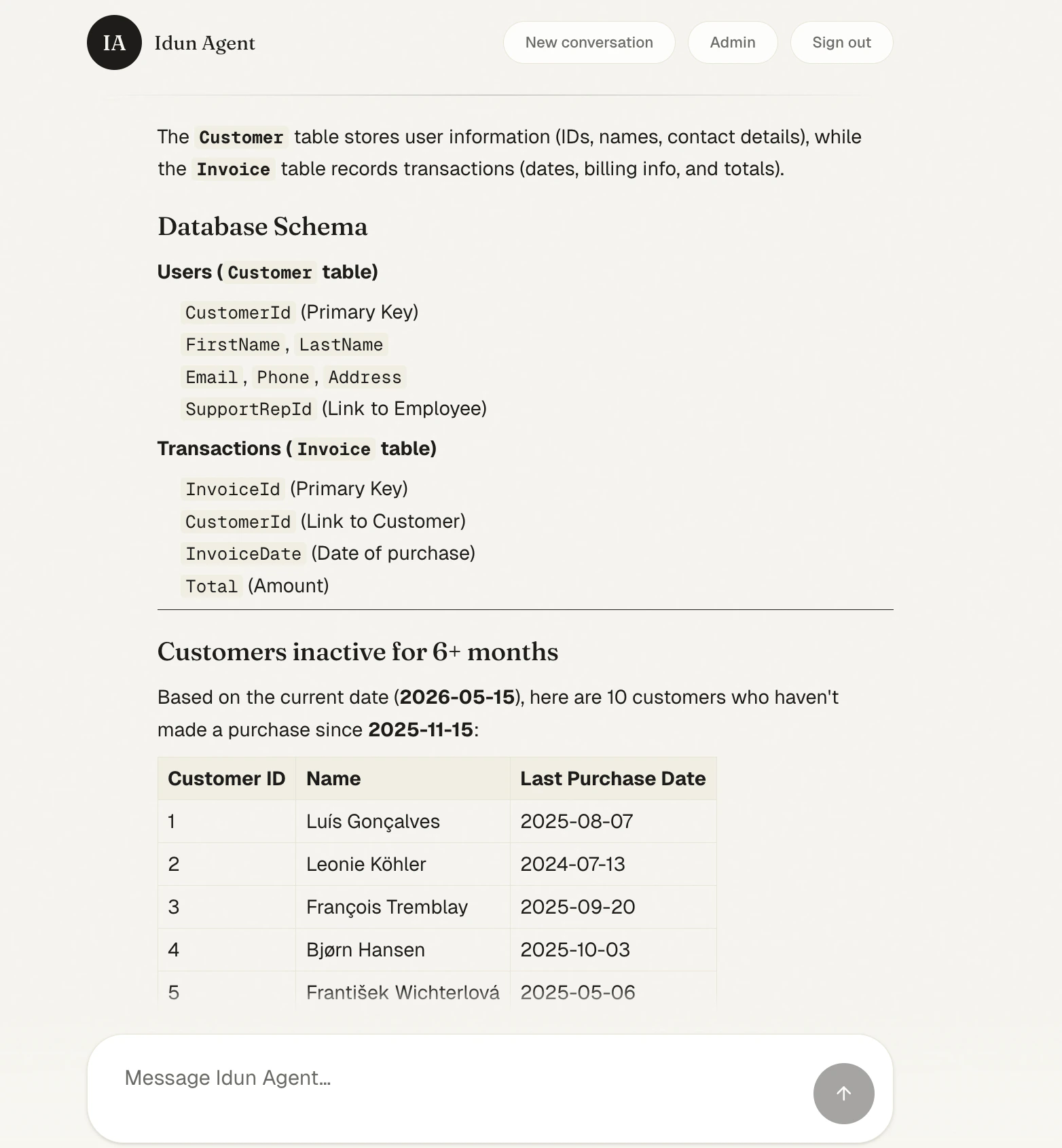
 Below the reasoning card, the agent renders the final answer: a clean schema breakdown and a table of the 10 customers who haven't bought anything in six months.
 Try a few more:
* "Top 5 best-selling artists?"
* "Which employee generated the most revenue, broken down by country?"
* "Plot revenue by genre and write a one-paragraph summary."
The same `POST /agent/run` endpoint is exposed at the API level — point CopilotKit, Vercel AI SDK, or any AG-UI client at it.
By default the LangGraph checkpointer is in-memory: restart the server and every conversation is gone. The **Memory** page in the admin lets you swap the backend without touching code.
Pick **SQLite**, set a file-backed URL (`sqlite:///deep.db`), **Save**. Idun reloads the checkpointer in place.
Try a few more:
* "Top 5 best-selling artists?"
* "Which employee generated the most revenue, broken down by country?"
* "Plot revenue by genre and write a one-paragraph summary."
The same `POST /agent/run` endpoint is exposed at the API level — point CopilotKit, Vercel AI SDK, or any AG-UI client at it.
By default the LangGraph checkpointer is in-memory: restart the server and every conversation is gone. The **Memory** page in the admin lets you swap the backend without touching code.
Pick **SQLite**, set a file-backed URL (`sqlite:///deep.db`), **Save**. Idun reloads the checkpointer in place.
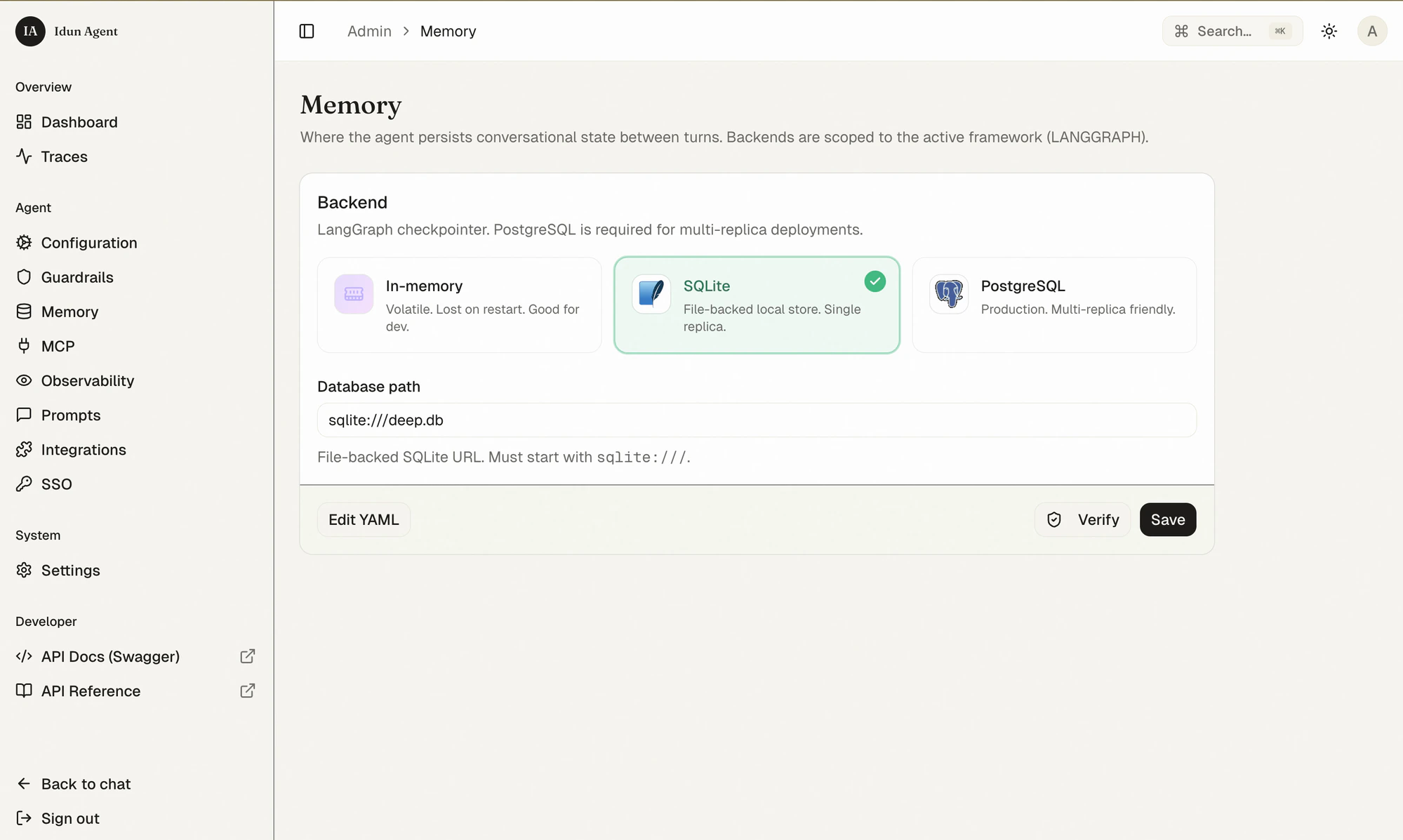 Back in the chat, every previous turn now lives in the **History** sidebar. New threads, named after their first message, persist across restarts.
 For multi-replica production deployments, swap SQLite for PostgreSQL the same way — same UI, same one-click reload.
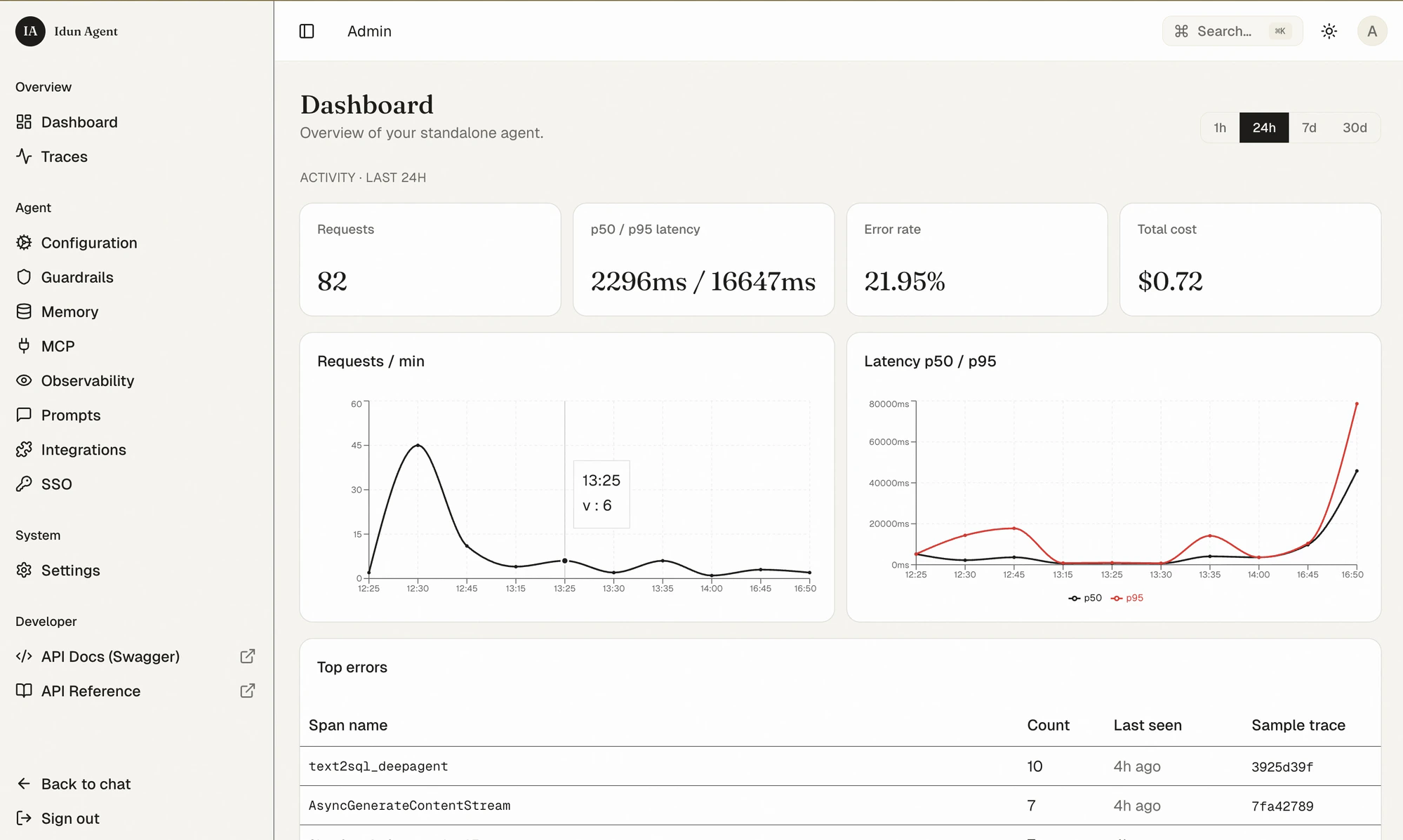
Before you wire up an external trace backend, Idun already gives you a built-in dashboard and a trace viewer powered by the same OpenTelemetry stream.
The **Dashboard** summarizes the last 24 hours: request count, p50/p95 latency, error rate, total cost, requests-per-minute and latency time series, and top error spans.
For multi-replica production deployments, swap SQLite for PostgreSQL the same way — same UI, same one-click reload.
Before you wire up an external trace backend, Idun already gives you a built-in dashboard and a trace viewer powered by the same OpenTelemetry stream.
The **Dashboard** summarizes the last 24 hours: request count, p50/p95 latency, error rate, total cost, requests-per-minute and latency time series, and top error spans.
 The **Traces** page lists every run with model, tokens, cost, and status — filter by model, status, user, or session.
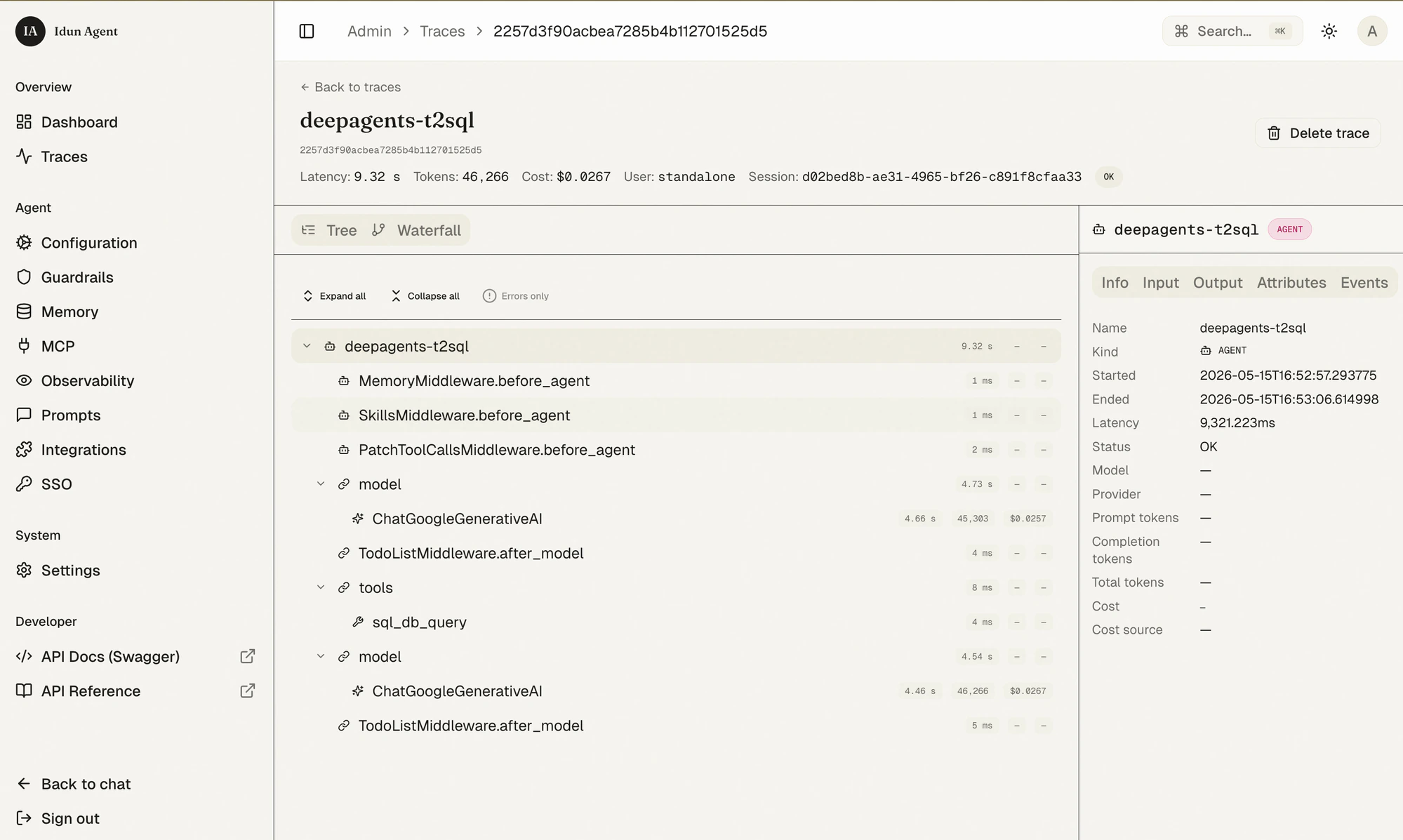
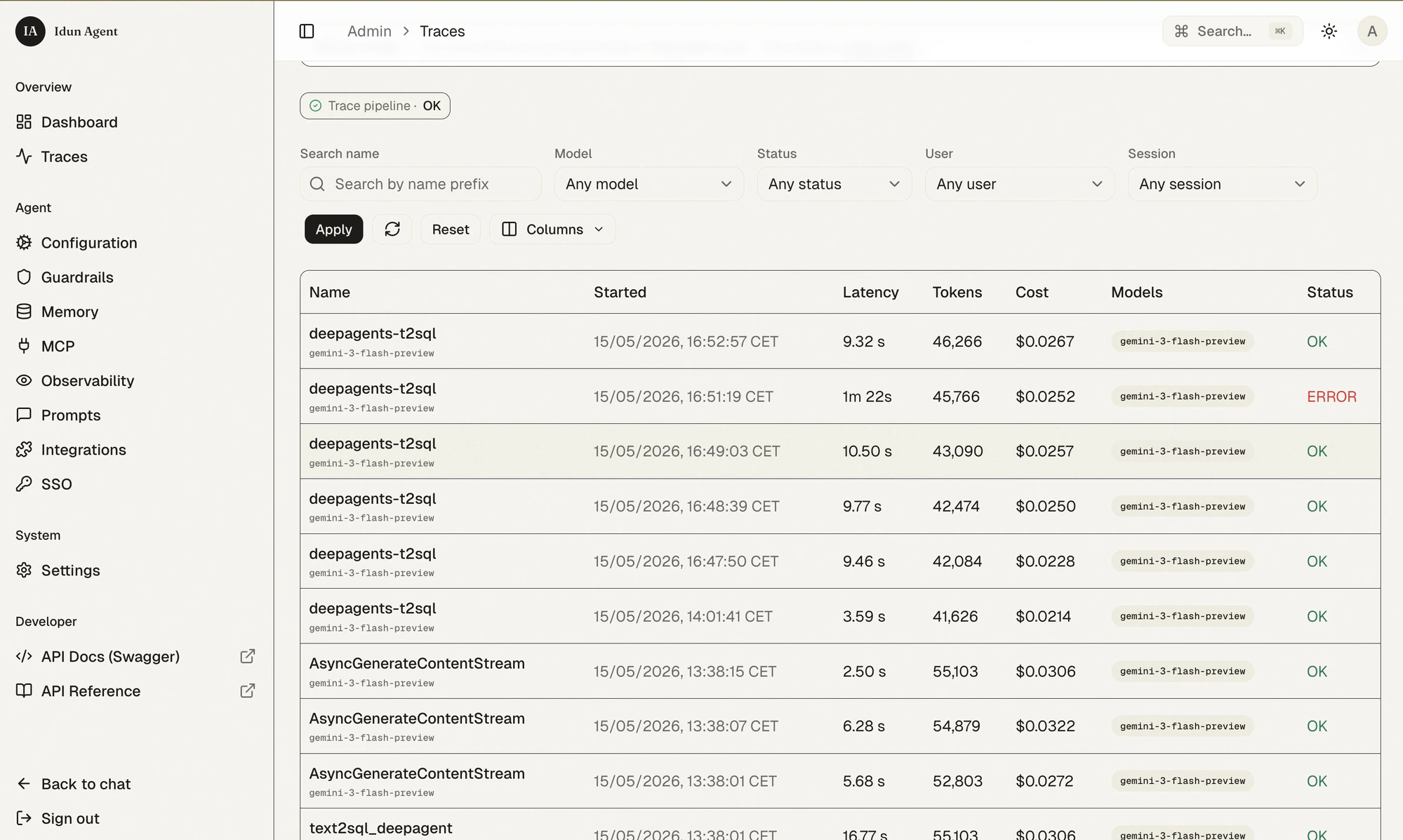 Click any trace to inspect the span tree. You see the same node structure as the agent graph, plus the `ChatGoogleGenerativeAI` calls with their token counts, and the `sql_db_query` tool span.
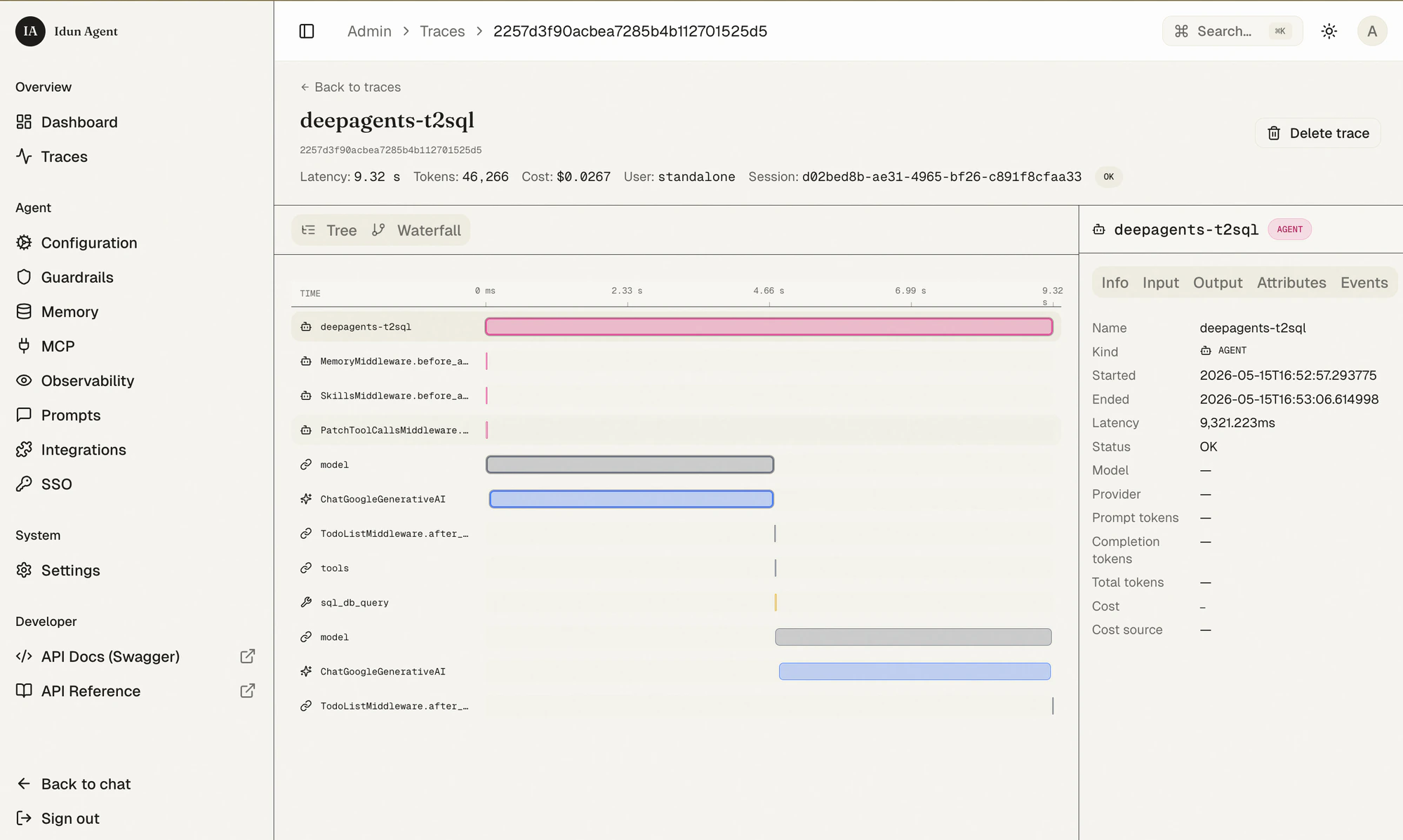
 Switch to **Waterfall** for the time-ordered view — which span ran in parallel, which blocked, where the latency lives.
 This works out of the box. Nothing to configure.
Already-rich built-in observability is fine for development. For long-term storage, evaluations, prompt management, and team-wide sharing, plug in [Langfuse](https://langfuse.com).
1. Sign up for [Langfuse Cloud](https://cloud.langfuse.com) (free) and create a project. Copy the public + secret keys.
2. In the Idun admin, open **Observability** → pick **Langfuse**, fill in host, public key, secret key, and a run name. Toggle **Enabled** and **Save**.
This works out of the box. Nothing to configure.
Already-rich built-in observability is fine for development. For long-term storage, evaluations, prompt management, and team-wide sharing, plug in [Langfuse](https://langfuse.com).
1. Sign up for [Langfuse Cloud](https://cloud.langfuse.com) (free) and create a project. Copy the public + secret keys.
2. In the Idun admin, open **Observability** → pick **Langfuse**, fill in host, public key, secret key, and a run name. Toggle **Enabled** and **Save**.
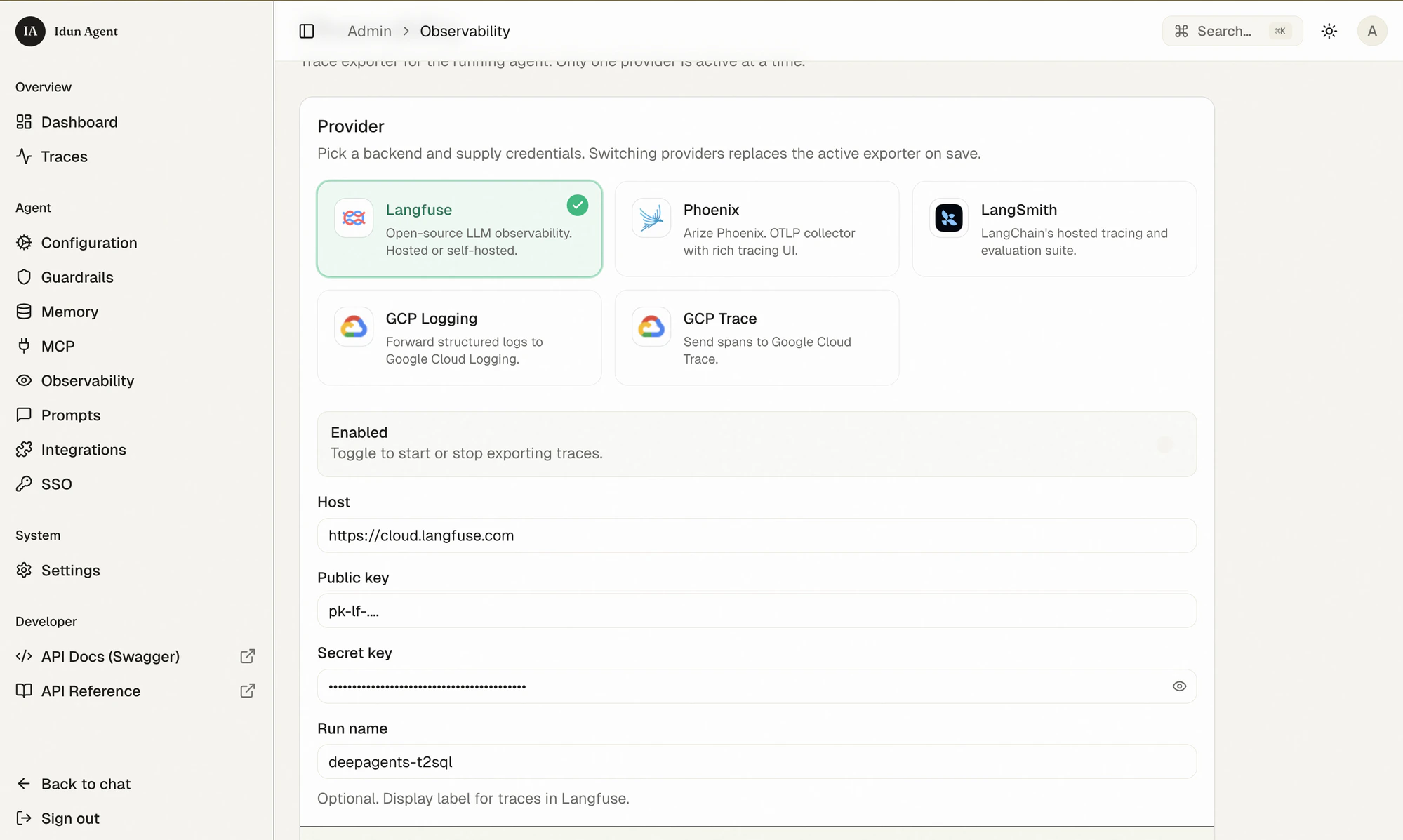 3. Ask the agent another question. Refresh the Langfuse dashboard.
Every Deep Agent step is captured: the middleware hooks, each `ChatGoogleGenerativeAI` call with tokens and cost, the tool spans, the full prompt/completion pair. Langfuse also renders the graph topology — same nodes you saw inside Idun, now persisted for evaluation runs and team review.
3. Ask the agent another question. Refresh the Langfuse dashboard.
Every Deep Agent step is captured: the middleware hooks, each `ChatGoogleGenerativeAI` call with tokens and cost, the tool spans, the full prompt/completion pair. Langfuse also renders the graph topology — same nodes you saw inside Idun, now persisted for evaluation runs and team review.
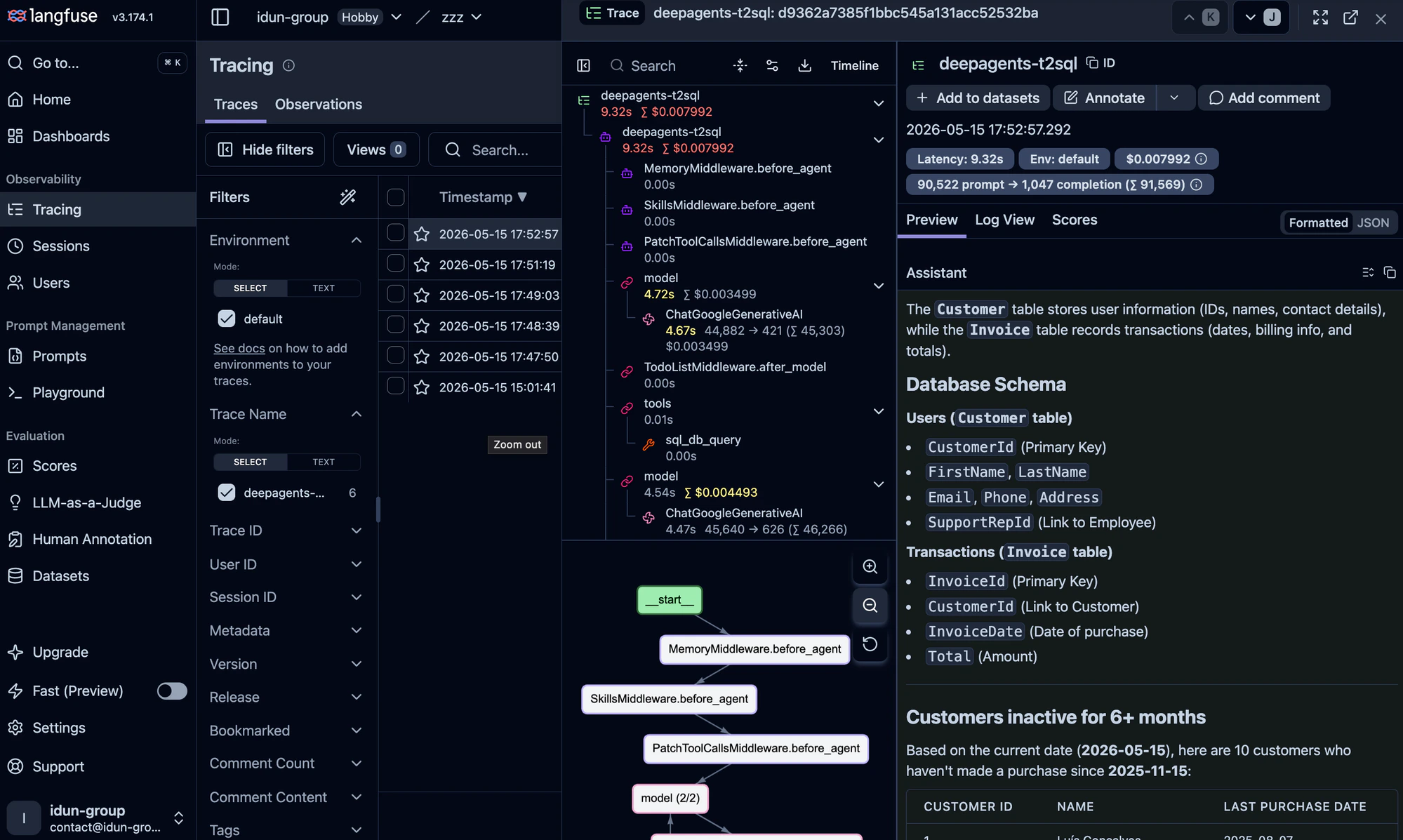 Idun supports Langfuse, Arize Phoenix, LangSmith, GCP Trace, and GCP Logging side-by-side. They don't conflict; add more on the same Observability page.
Now the fun part: give the agent the ability to email its findings. We'll use the open-source [Google Workspace MCP server](https://github.com/taylorwilsdon/google_workspace_mcp), which exposes Gmail, Calendar, Drive, Docs, Sheets, Slides, and Forms as MCP tools.
### 9a. Get a Desktop OAuth client
In Google Cloud Console:
1. Create or pick a project, enable the **Gmail API** and **Google Docs API** (and any other Workspace APIs you want).
2. **APIs & Services → Credentials → Create credentials → OAuth client ID → Desktop app**.
3. Copy the client ID and secret into `.env`:
```bash .env theme={"theme":{"light":"github-light","dark":"github-dark"}}
GOOGLE_OAUTH_CLIENT_ID=...apps.googleusercontent.com
GOOGLE_OAUTH_CLIENT_SECRET=GOCSPX-...
USER_GOOGLE_EMAIL=you@yourdomain.com
OAUTHLIB_INSECURE_TRANSPORT=1 # localhost OAuth callback
```
### 9b. Start the MCP server
Run the Google Workspace MCP locally over streamable HTTP:
```bash theme={"theme":{"light":"github-light","dark":"github-dark"}}
uvx workspace-mcp --transport streamable-http --port 8000
```
The first time you connect, the server prints an OAuth URL — complete the consent flow once and the token is cached for future runs.
### 9c. Register the server in Idun
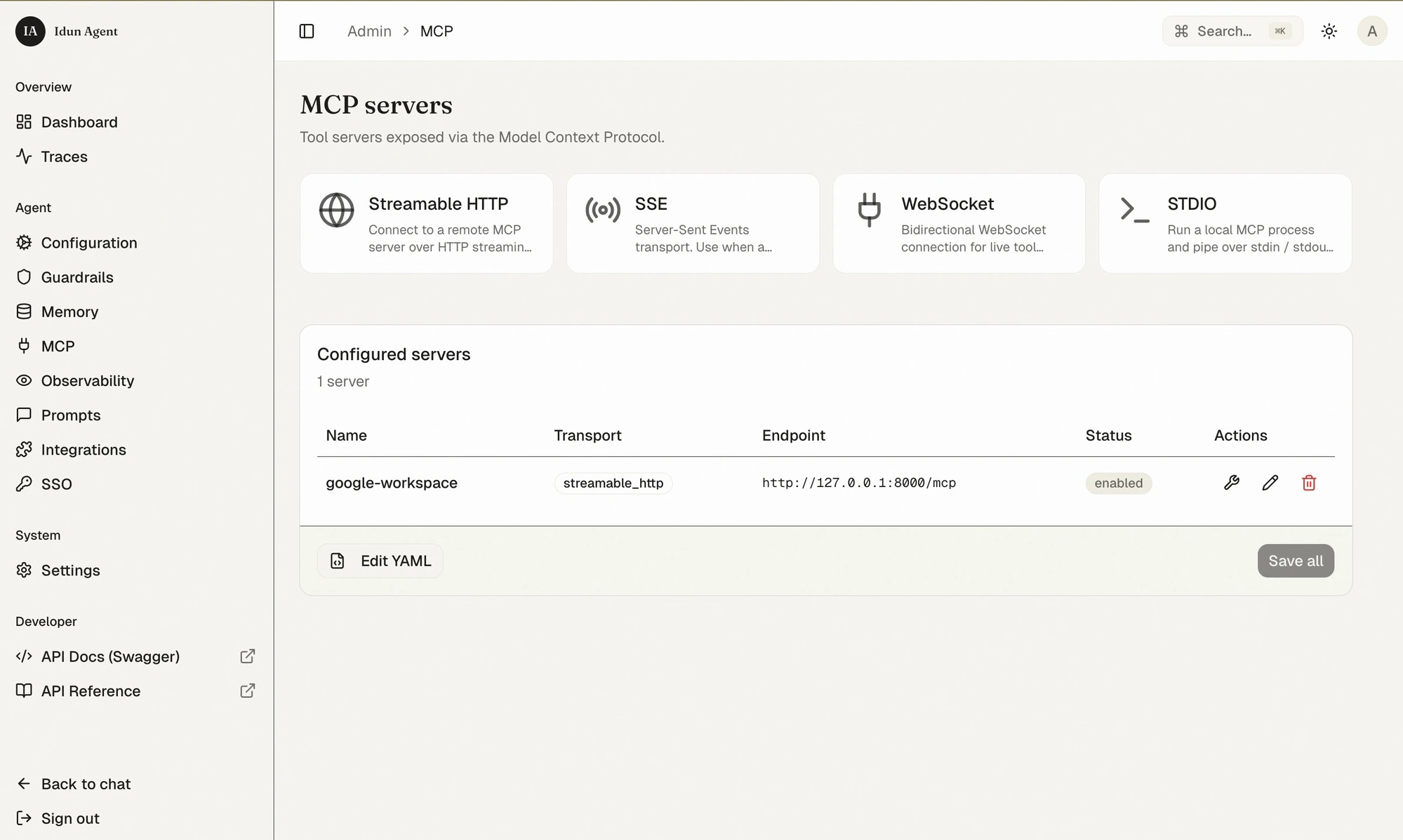
In the admin: **MCP** → pick **Streamable HTTP** → fill in the endpoint (`http://127.0.0.1:8000/mcp`), name it `google-workspace`, save.
Idun supports Langfuse, Arize Phoenix, LangSmith, GCP Trace, and GCP Logging side-by-side. They don't conflict; add more on the same Observability page.
Now the fun part: give the agent the ability to email its findings. We'll use the open-source [Google Workspace MCP server](https://github.com/taylorwilsdon/google_workspace_mcp), which exposes Gmail, Calendar, Drive, Docs, Sheets, Slides, and Forms as MCP tools.
### 9a. Get a Desktop OAuth client
In Google Cloud Console:
1. Create or pick a project, enable the **Gmail API** and **Google Docs API** (and any other Workspace APIs you want).
2. **APIs & Services → Credentials → Create credentials → OAuth client ID → Desktop app**.
3. Copy the client ID and secret into `.env`:
```bash .env theme={"theme":{"light":"github-light","dark":"github-dark"}}
GOOGLE_OAUTH_CLIENT_ID=...apps.googleusercontent.com
GOOGLE_OAUTH_CLIENT_SECRET=GOCSPX-...
USER_GOOGLE_EMAIL=you@yourdomain.com
OAUTHLIB_INSECURE_TRANSPORT=1 # localhost OAuth callback
```
### 9b. Start the MCP server
Run the Google Workspace MCP locally over streamable HTTP:
```bash theme={"theme":{"light":"github-light","dark":"github-dark"}}
uvx workspace-mcp --transport streamable-http --port 8000
```
The first time you connect, the server prints an OAuth URL — complete the consent flow once and the token is cached for future runs.
### 9c. Register the server in Idun
In the admin: **MCP** → pick **Streamable HTTP** → fill in the endpoint (`http://127.0.0.1:8000/mcp`), name it `google-workspace`, save.
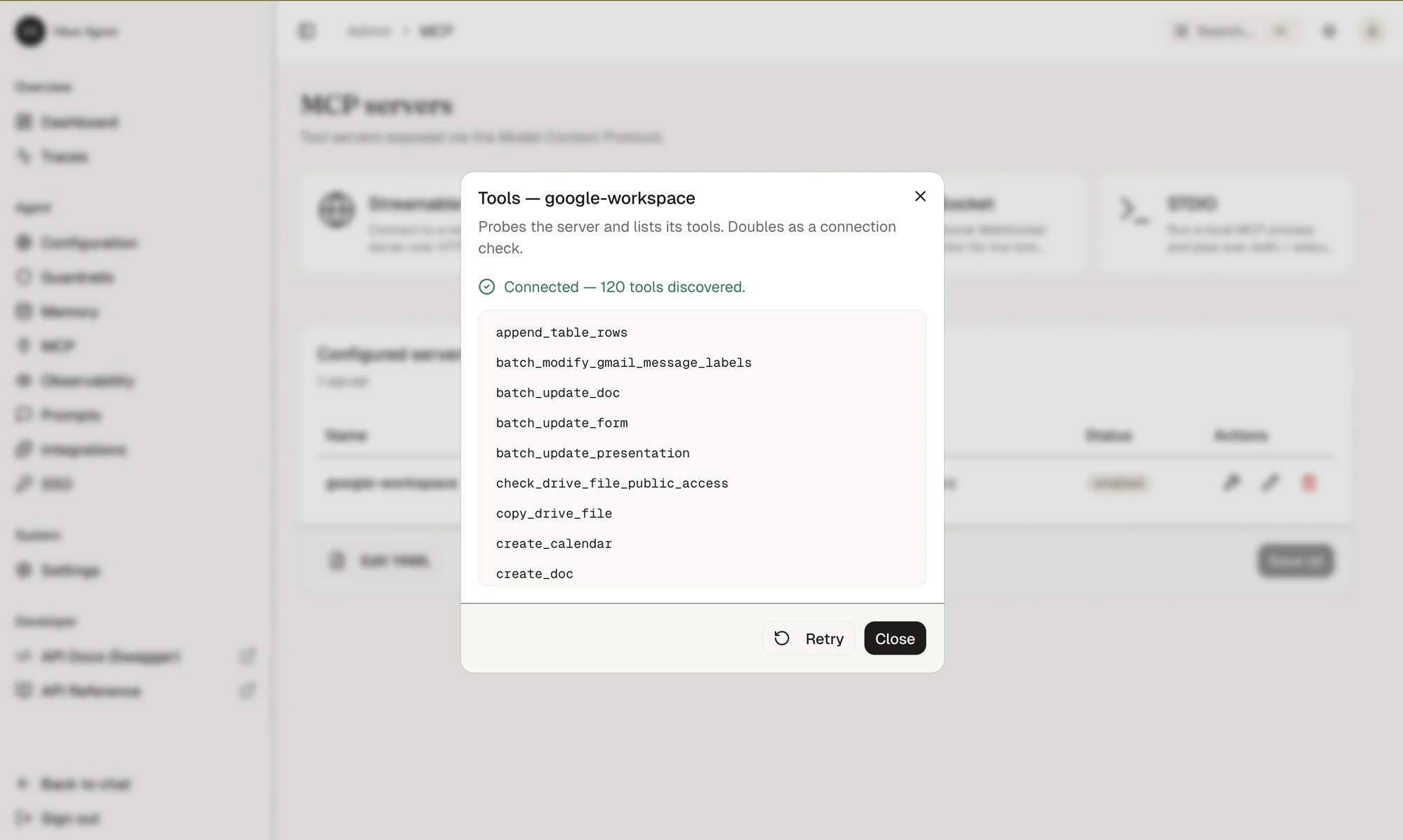
 Click the wrench (🔧) to probe the server. Idun lists every tool it discovered — `send_gmail_message`, `create_doc`, `create_calendar`, `append_table_rows`, and 116 others.
 ### 9d. Wire the tools into the Deep Agent
Deep Agents bind tools at construction time, so we expose Idun's configured MCP tools to `create_deep_agent`. The engine ships an async helper for this — `idun_agent_engine.mcp.get_langchain_tools` — that reads the MCP servers from your Idun config and returns ready-to-use LangChain tools.
Because `agent.py` is imported at module load (inside the engine's lifespan, where an event loop is already running), we wrap the async helper in a one-shot thread so it can be called synchronously:
```python agent.py theme={"theme":{"light":"github-light","dark":"github-dark"}}
import asyncio
from concurrent.futures import ThreadPoolExecutor
from pathlib import Path
from typing import Any
from idun_agent_engine.mcp import get_langchain_tools
def get_langchain_tools_sync(config_path: str | Path | None = None) -> list[Any]:
"""Run the async ``get_langchain_tools`` from sync code at module load."""
with ThreadPoolExecutor(max_workers=1) as ex:
return ex.submit(asyncio.run, get_langchain_tools(config_path)).result()
idun_tools = get_langchain_tools_sync()
# ... inside create_sql_deep_agent():
return create_deep_agent(
model=model,
memory=["./AGENTS.md"],
skills=["./skills/"],
tools=sql_tools + idun_tools,
backend=FilesystemBackend(root_dir=base_dir),
)
```
Restart the engine (admin → Agent → **Restart**) and the Deep Agent now sees the 120 MCP tools alongside its SQL toolkit.
### 9e. Ask the agent to ship the report
Back in chat:
> Find the 10 customers who haven't bought anything in 6 months. Write up a detailed report as a Google Doc and email it to me at `you@example.com`.
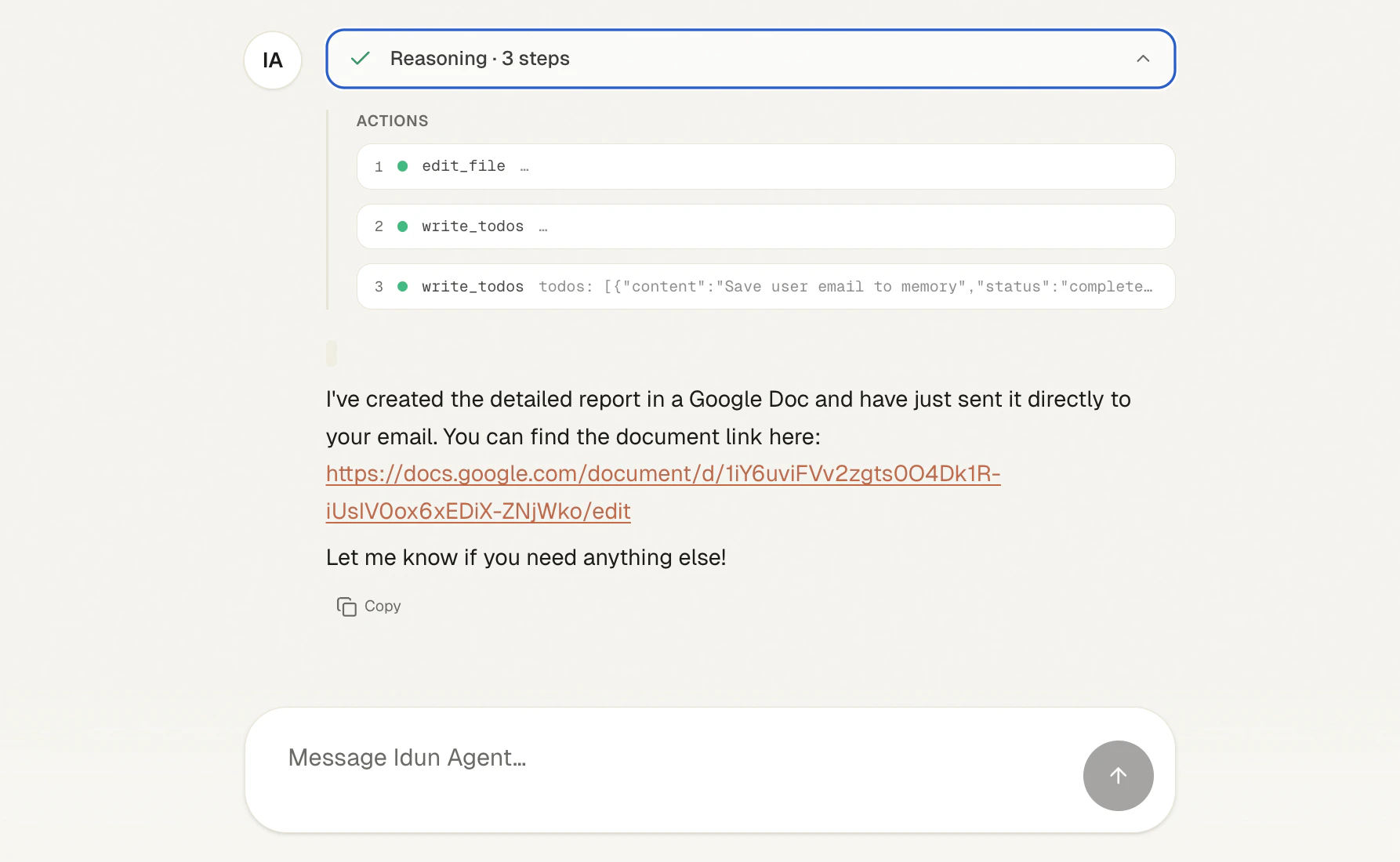
The Deep Agent plans, runs the SQL, edits its working file with the report content, saves your address to memory via `write_todos`, then calls the MCP tools to create a Google Doc and send the email with the doc linked.
### 9d. Wire the tools into the Deep Agent
Deep Agents bind tools at construction time, so we expose Idun's configured MCP tools to `create_deep_agent`. The engine ships an async helper for this — `idun_agent_engine.mcp.get_langchain_tools` — that reads the MCP servers from your Idun config and returns ready-to-use LangChain tools.
Because `agent.py` is imported at module load (inside the engine's lifespan, where an event loop is already running), we wrap the async helper in a one-shot thread so it can be called synchronously:
```python agent.py theme={"theme":{"light":"github-light","dark":"github-dark"}}
import asyncio
from concurrent.futures import ThreadPoolExecutor
from pathlib import Path
from typing import Any
from idun_agent_engine.mcp import get_langchain_tools
def get_langchain_tools_sync(config_path: str | Path | None = None) -> list[Any]:
"""Run the async ``get_langchain_tools`` from sync code at module load."""
with ThreadPoolExecutor(max_workers=1) as ex:
return ex.submit(asyncio.run, get_langchain_tools(config_path)).result()
idun_tools = get_langchain_tools_sync()
# ... inside create_sql_deep_agent():
return create_deep_agent(
model=model,
memory=["./AGENTS.md"],
skills=["./skills/"],
tools=sql_tools + idun_tools,
backend=FilesystemBackend(root_dir=base_dir),
)
```
Restart the engine (admin → Agent → **Restart**) and the Deep Agent now sees the 120 MCP tools alongside its SQL toolkit.
### 9e. Ask the agent to ship the report
Back in chat:
> Find the 10 customers who haven't bought anything in 6 months. Write up a detailed report as a Google Doc and email it to me at `you@example.com`.
The Deep Agent plans, runs the SQL, edits its working file with the report content, saves your address to memory via `write_todos`, then calls the MCP tools to create a Google Doc and send the email with the doc linked.
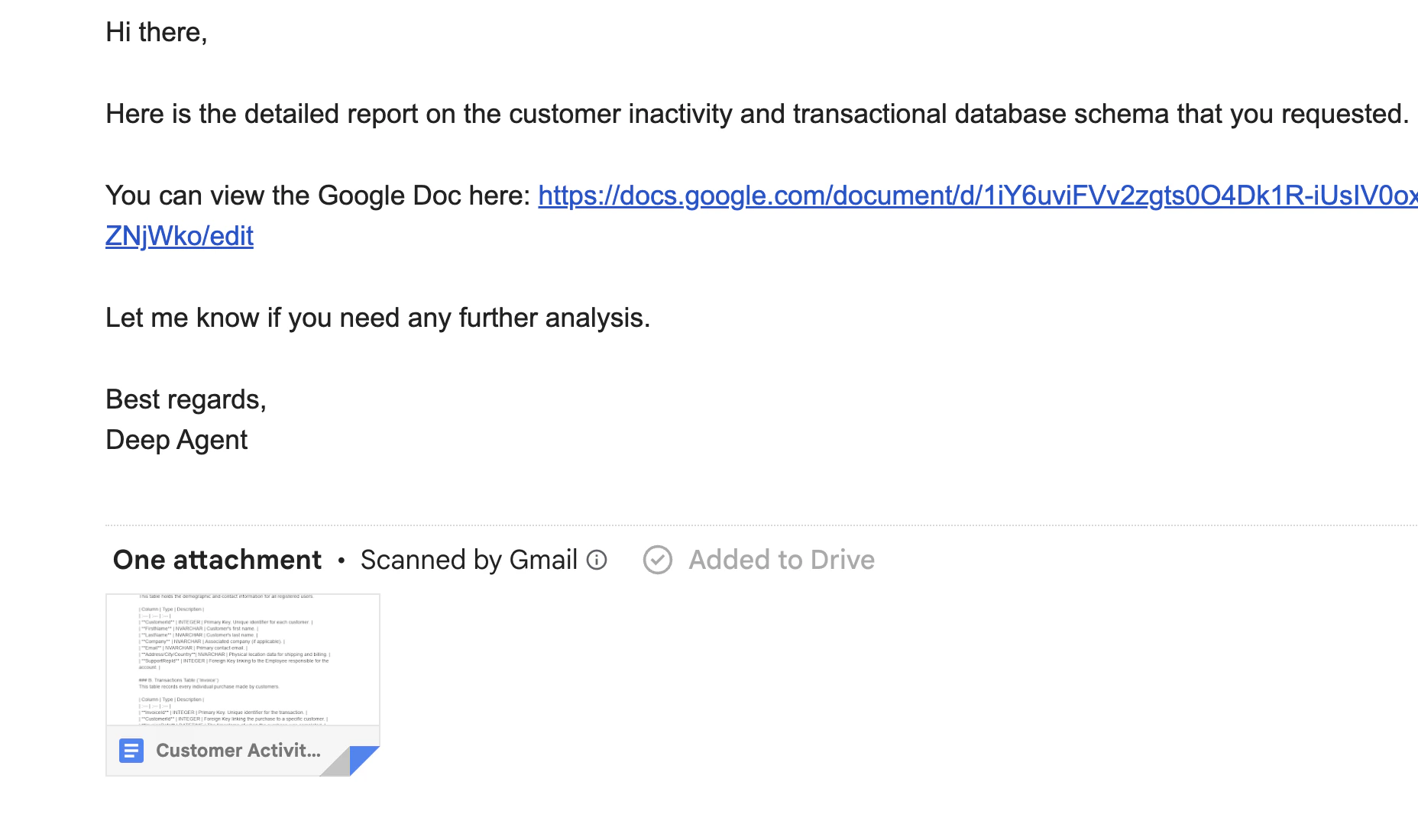
 Check your inbox: the agent sent a clean message with the Doc link, signed as "Deep Agent", with the Google Doc auto-attached by Gmail.
 And because Langfuse is still attached, the `create_doc` and `send_gmail_message` calls show up in the trace alongside the SQL steps — full causal chain in one place.
## What this gave you
Starting from an `agent.py` you didn't touch, you got:
| | Without Idun | With Idun |
| ------------------- | --------------------------------- | ------------------------------- |
| API serving | Write FastAPI yourself | `idun init` |
| Streaming protocol | Map `astream_events` by hand | AG-UI out of the box |
| Chat UI | Build a frontend | Bundled |
| Conversation memory | Wire up checkpointer + thread IDs | One-click backend swap |
| Dashboard | Hand-roll Prometheus + Grafana | Built in |
| Distributed tracing | Instrument OTLP manually | Built in + plug Langfuse on top |
| MCP tools | Write LangChain adapters | Register, discover, attach |
Total engine code written: **zero lines**.
## Next steps
turn off `IDUN_ALLOW_OPEN_ADMIN`, add SSO/OIDC, generate API keys for `/agent/run`.
when you go multi-replica — same Memory page, same one-click reload.
(PII, prompt injection) before exposing the chat publicly.
with the provided Dockerfile.
The Deep Agents framework gives you planning, filesystem, and subagents. Idun gives you the production wrapper. Together: an agent you can actually ship.
And because Langfuse is still attached, the `create_doc` and `send_gmail_message` calls show up in the trace alongside the SQL steps — full causal chain in one place.
## What this gave you
Starting from an `agent.py` you didn't touch, you got:
| | Without Idun | With Idun |
| ------------------- | --------------------------------- | ------------------------------- |
| API serving | Write FastAPI yourself | `idun init` |
| Streaming protocol | Map `astream_events` by hand | AG-UI out of the box |
| Chat UI | Build a frontend | Bundled |
| Conversation memory | Wire up checkpointer + thread IDs | One-click backend swap |
| Dashboard | Hand-roll Prometheus + Grafana | Built in |
| Distributed tracing | Instrument OTLP manually | Built in + plug Langfuse on top |
| MCP tools | Write LangChain adapters | Register, discover, attach |
Total engine code written: **zero lines**.
## Next steps
turn off `IDUN_ALLOW_OPEN_ADMIN`, add SSO/OIDC, generate API keys for `/agent/run`.
when you go multi-replica — same Memory page, same one-click reload.
(PII, prompt injection) before exposing the chat publicly.
with the provided Dockerfile.
The Deep Agents framework gives you planning, filesystem, and subagents. Idun gives you the production wrapper. Together: an agent you can actually ship.