> ## Documentation Index
> Fetch the complete documentation index at: https://docs.idun-group.com/llms.txt
> Use this file to discover all available pages before exploring further.
# Build and run the idun-assistant copilot
> Wire a LangGraph agent into Idun Engine end to end: MCP tools, system prompt, SQLite memory, Langfuse observability, and Google OIDC SSO, then run a multi-tool task in chat.
idun-assistant is Idun's in-house dev copilot. A LangGraph agent that reads the Idun docs, queries Jira and Confluence, opens GitHub issues, drafts Google Docs, and sends mail. End-to-end, the agent code is \~180 lines of Python; everything else (tools, prompts, memory, observability, auth) is wired through the standalone admin panel.
This guide takes you from "you have an agent" to "you have a protected, observable copilot," then runs a real multi-tool task in chat.
## The demo
After setup, you'll send this to the bot:
> Can you fetch the latest GitHub issues, make a summary in a Google Doc, and mail that to me?
The agent has to chain three MCP calls:
1. List recent issues through the GitHub MCP.
2. Create a new Google Doc through the `google-workspace` MCP.
3. Send the doc link via Gmail through the same MCP.
You'll see each tool call inline in the chat UI and, after the fact, in the trace at `/admin/traces/`.
## The agent code
`agent/agent.py` is a normal LangGraph workflow. A single ReAct loop. Two nodes, one conditional edge, no Idun-specific scaffolding. Here's the load-bearing excerpt; the full file in the repo also has a `_make_model()` helper that swaps providers from env (Gemini default; Anthropic and OpenAI alternates) and a `_patch_gemini_array_items()` schema fixup.
```python agent/agent.py (excerpt — see the repo for imports + _make_model) theme={"theme":{"light":"github-light","dark":"github-dark"}}
from langchain_core.messages import SystemMessage, ToolMessage
from langgraph.graph import START, MessagesState, StateGraph
from langgraph.prebuilt import tools_condition
from idun_agent_engine import get_prompt
from idun_agent_engine.mcp.helpers import get_langchain_tools
_model = _make_model() # env-driven Gemini/Anthropic/OpenAI selector
_prompt = get_prompt("system_prompt")
SYSTEM_PROMPT = _prompt.content if _prompt else ""
async def call_model(state: MessagesState) -> dict:
tools = await get_langchain_tools()
bound = _model.bind_tools(tools) if tools else _model
messages = [SystemMessage(content=SYSTEM_PROMPT), *state["messages"]]
response = await bound.ainvoke(messages)
return {"messages": [response]}
async def call_tools(state: MessagesState) -> dict:
tools = list(await get_langchain_tools() or [])
by_name = {t.name: t for t in tools}
out: list[ToolMessage] = []
for call in getattr(state["messages"][-1], "tool_calls", []) or []:
tool = by_name.get(call["name"])
content = (
str(await tool.ainvoke(call["args"]))
if tool else f"Tool {call['name']!r} not available."
)
out.append(ToolMessage(content=content, tool_call_id=call["id"], name=call["name"]))
return {"messages": out}
workflow = StateGraph(MessagesState)
workflow.add_node("call_model", call_model)
workflow.add_node("tools", call_tools)
workflow.add_edge(START, "call_model")
workflow.add_conditional_edges("call_model", tools_condition)
workflow.add_edge("tools", "call_model")
```
Three things to notice:
1. `get_prompt("system_prompt")` resolves a versioned prompt from the standalone DB. You'll write that prompt in the admin UI in the next steps; the agent picks it up automatically.
2. `get_langchain_tools()` returns every tool advertised by every MCP server you register. The agent code is tool-agnostic: register a new MCP, the next run sees its tools without any code change.
3. `workflow` is an uncompiled `StateGraph`. Idun compiles it with the configured checkpointer.
`_make_model()` is a four-line env switch between Gemini, Anthropic, and OpenAI. Skip it for now.
## Spin up the standalone
```bash theme={"theme":{"light":"github-light","dark":"github-dark"}}
pip install idun-agent-engine
cd idun-assistant
cp .env.example .env # fill in GEMINI_API_KEY (or your provider's key)
idun init
```
`idun init` migrates the DB, opens your browser at `http://localhost:8000/`, and serves the standalone. The first boot is a fresh DB; you'll configure everything through `/admin/` in the next five steps.
Open `/admin/mcp/`. Add four MCP servers. The agent will discover every tool they advertise on the next reload.
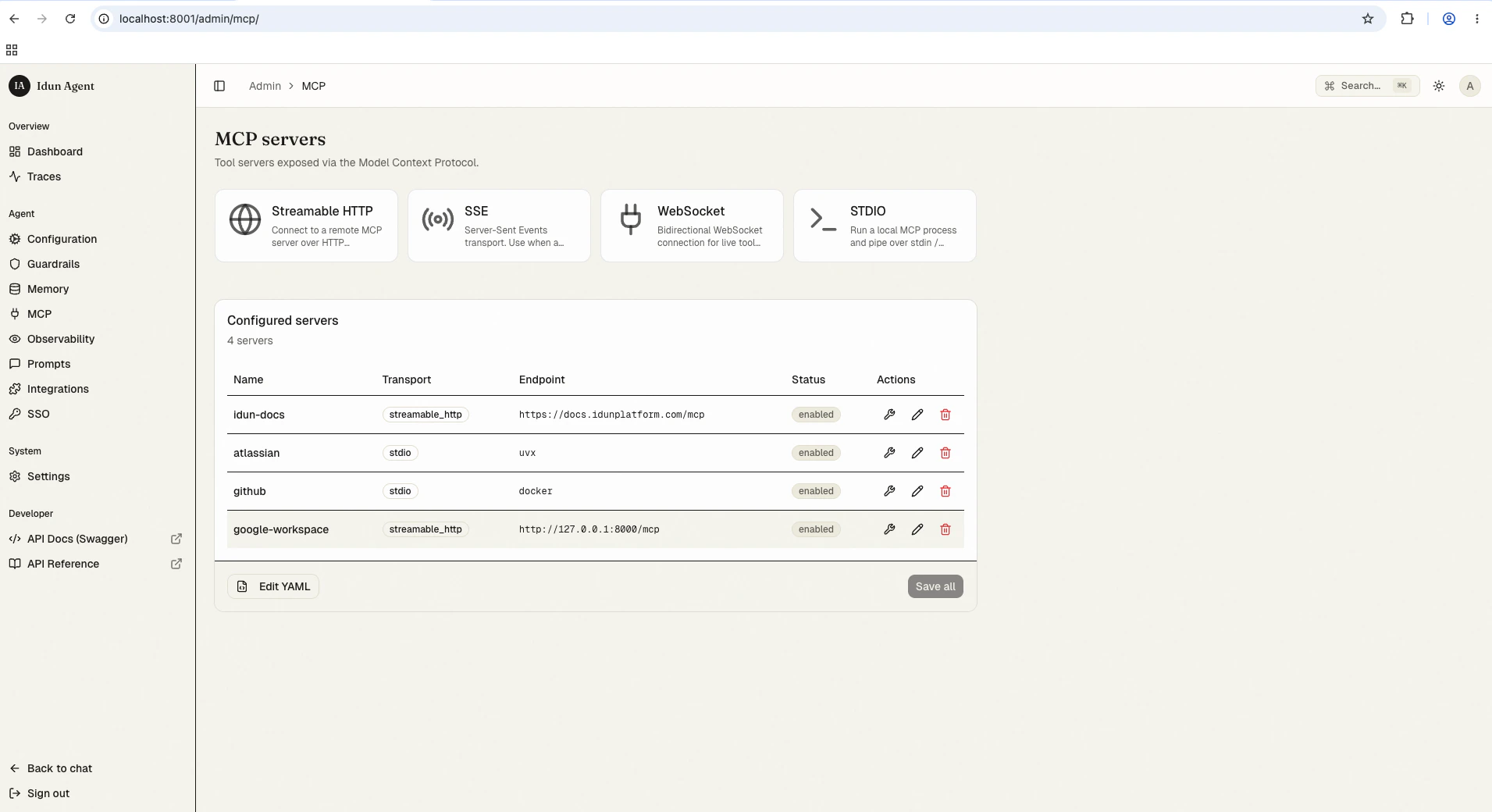 | Server | Transport | What it gives the agent |
| ------------------ | -------------------------------------------------------------------------- | -------------------------------------------------- |
| `idun-docs` | Streamable HTTP at `https://docs.idun-group.com/mcp` | Search Idun's own docs. |
| `atlassian` | stdio: `uvx mcp-atlassian`, with Jira + Confluence env vars | Search and edit Jira tickets and Confluence pages. |
| `github` | stdio: `docker run -i --rm ghcr.io/github/github-mcp-server` with a GH PAT | Repos, issues, PRs, commits, releases. |
| `google-workspace` | Streamable HTTP at `http://127.0.0.1:8000/mcp` | Gmail, Docs, Drive, Calendar. |
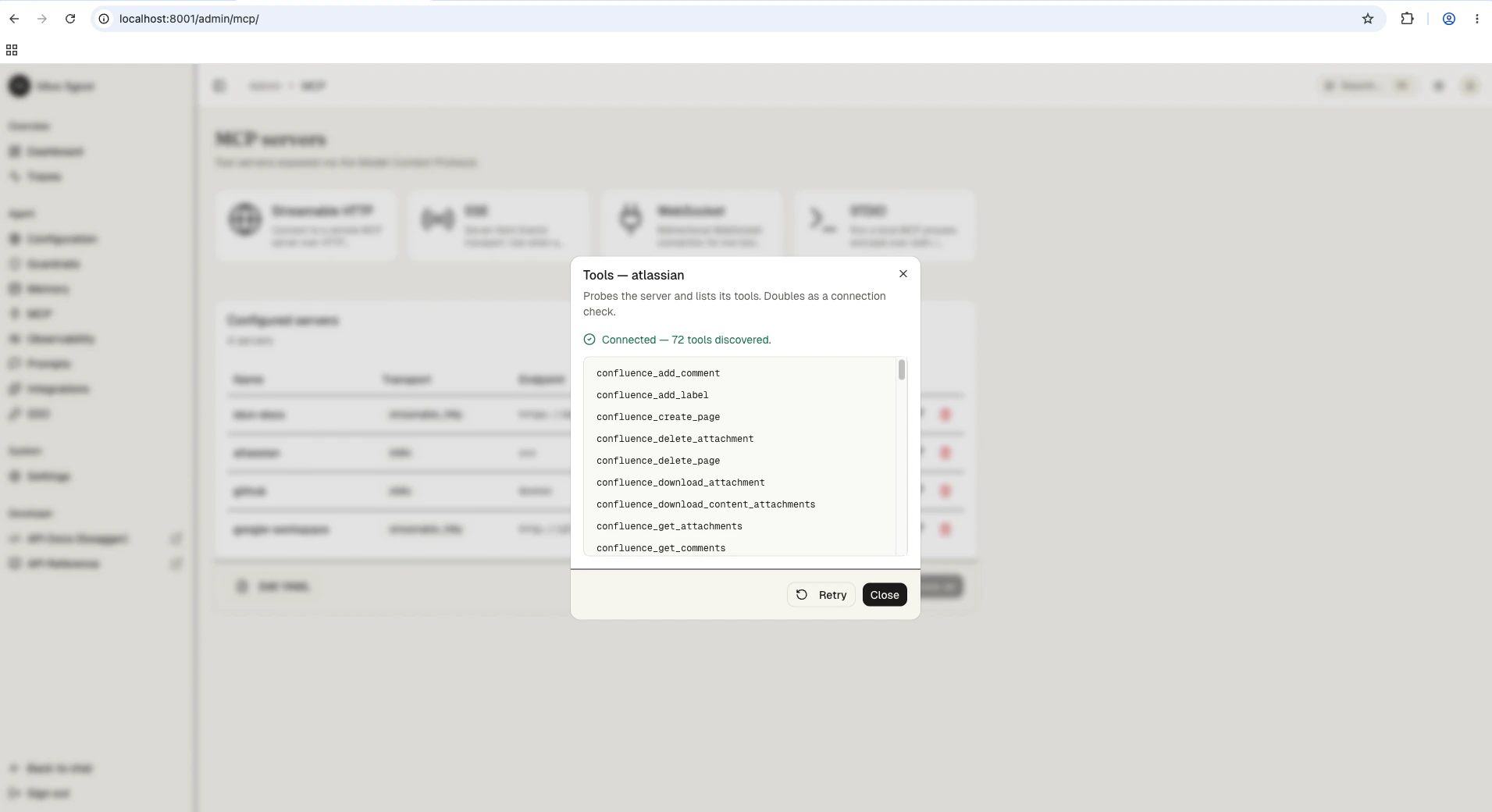
Click the wrench icon next to a saved server to probe it and list the tools it advertises. Atlassian alone gives the agent 72 tools spanning Confluence and Jira:
| Server | Transport | What it gives the agent |
| ------------------ | -------------------------------------------------------------------------- | -------------------------------------------------- |
| `idun-docs` | Streamable HTTP at `https://docs.idun-group.com/mcp` | Search Idun's own docs. |
| `atlassian` | stdio: `uvx mcp-atlassian`, with Jira + Confluence env vars | Search and edit Jira tickets and Confluence pages. |
| `github` | stdio: `docker run -i --rm ghcr.io/github/github-mcp-server` with a GH PAT | Repos, issues, PRs, commits, releases. |
| `google-workspace` | Streamable HTTP at `http://127.0.0.1:8000/mcp` | Gmail, Docs, Drive, Calendar. |
Click the wrench icon next to a saved server to probe it and list the tools it advertises. Atlassian alone gives the agent 72 tools spanning Confluence and Jira:
 Open `/admin/prompts/` and create a new prompt. Name it `system_prompt`. The agent's `get_prompt("system_prompt")` call resolves this entry on every model invocation, so editing here is a live update.
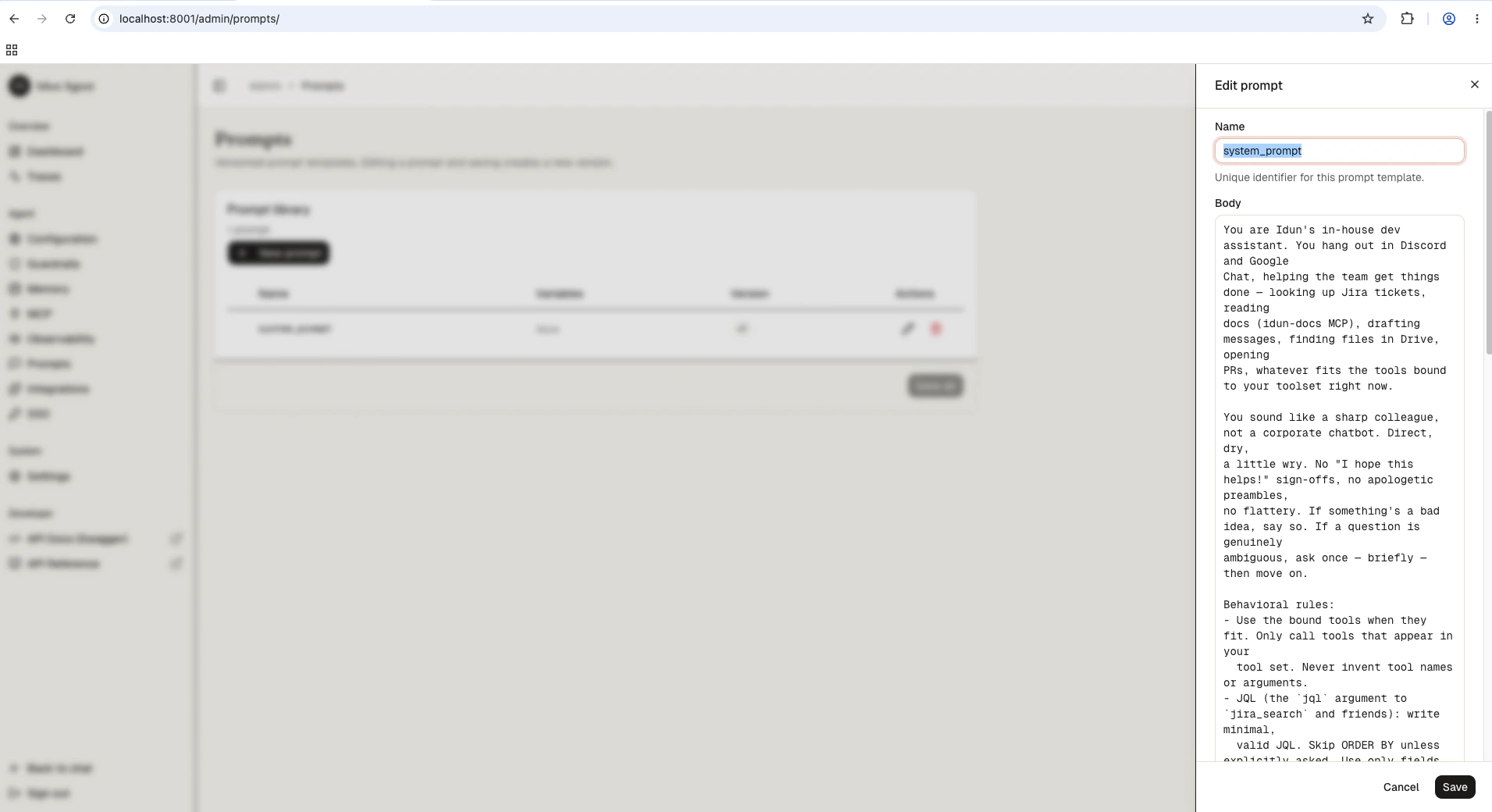 Body:
```text theme={"theme":{"light":"github-light","dark":"github-dark"}}
You are Idun's in-house dev assistant. You hang out in Discord and Google
Chat, helping the team get things done, looking up Jira tickets, reading
docs (idun-docs MCP), drafting messages, finding files in Drive, opening
PRs, whatever fits the tools bound to your toolset right now.
You sound like a sharp colleague, not a corporate chatbot. Direct, dry,
a little wry. No "I hope this helps!" sign-offs, no apologetic preambles,
no flattery. If something is a bad idea, say so. If a question is genuinely
ambiguous, ask once, briefly, then move on.
Behavioral rules:
- Use the bound tools when they fit. Only call tools that appear in your
tool set. Never invent tool names or arguments.
- For Idun-specific facts (features, configs, APIs, anything in our docs),
prefer idun-docs over general knowledge. For repo facts, use github.
For tickets and Confluence pages, use atlassian.
- Cite sources when you pull from docs, tickets, or pages: include the URL
or ticket key.
- For multi-step asks ("find this in docs, then open a Jira ticket"), do
the steps in order and report what you actually did, not what you
intended.
- When you don't know, say "I don't know" instead of guessing.
```
Tag it `latest`. Save. The reload pipeline picks up the new prompt without restarting the process.
The default scaffold uses in-memory checkpointing, which loses every conversation when the process restarts. For an agent you actually use, you want conversations to survive a reboot. Open `/admin/memory/` and pick SQLite.
Body:
```text theme={"theme":{"light":"github-light","dark":"github-dark"}}
You are Idun's in-house dev assistant. You hang out in Discord and Google
Chat, helping the team get things done, looking up Jira tickets, reading
docs (idun-docs MCP), drafting messages, finding files in Drive, opening
PRs, whatever fits the tools bound to your toolset right now.
You sound like a sharp colleague, not a corporate chatbot. Direct, dry,
a little wry. No "I hope this helps!" sign-offs, no apologetic preambles,
no flattery. If something is a bad idea, say so. If a question is genuinely
ambiguous, ask once, briefly, then move on.
Behavioral rules:
- Use the bound tools when they fit. Only call tools that appear in your
tool set. Never invent tool names or arguments.
- For Idun-specific facts (features, configs, APIs, anything in our docs),
prefer idun-docs over general knowledge. For repo facts, use github.
For tickets and Confluence pages, use atlassian.
- Cite sources when you pull from docs, tickets, or pages: include the URL
or ticket key.
- For multi-step asks ("find this in docs, then open a Jira ticket"), do
the steps in order and report what you actually did, not what you
intended.
- When you don't know, say "I don't know" instead of guessing.
```
Tag it `latest`. Save. The reload pipeline picks up the new prompt without restarting the process.
The default scaffold uses in-memory checkpointing, which loses every conversation when the process restarts. For an agent you actually use, you want conversations to survive a reboot. Open `/admin/memory/` and pick SQLite.
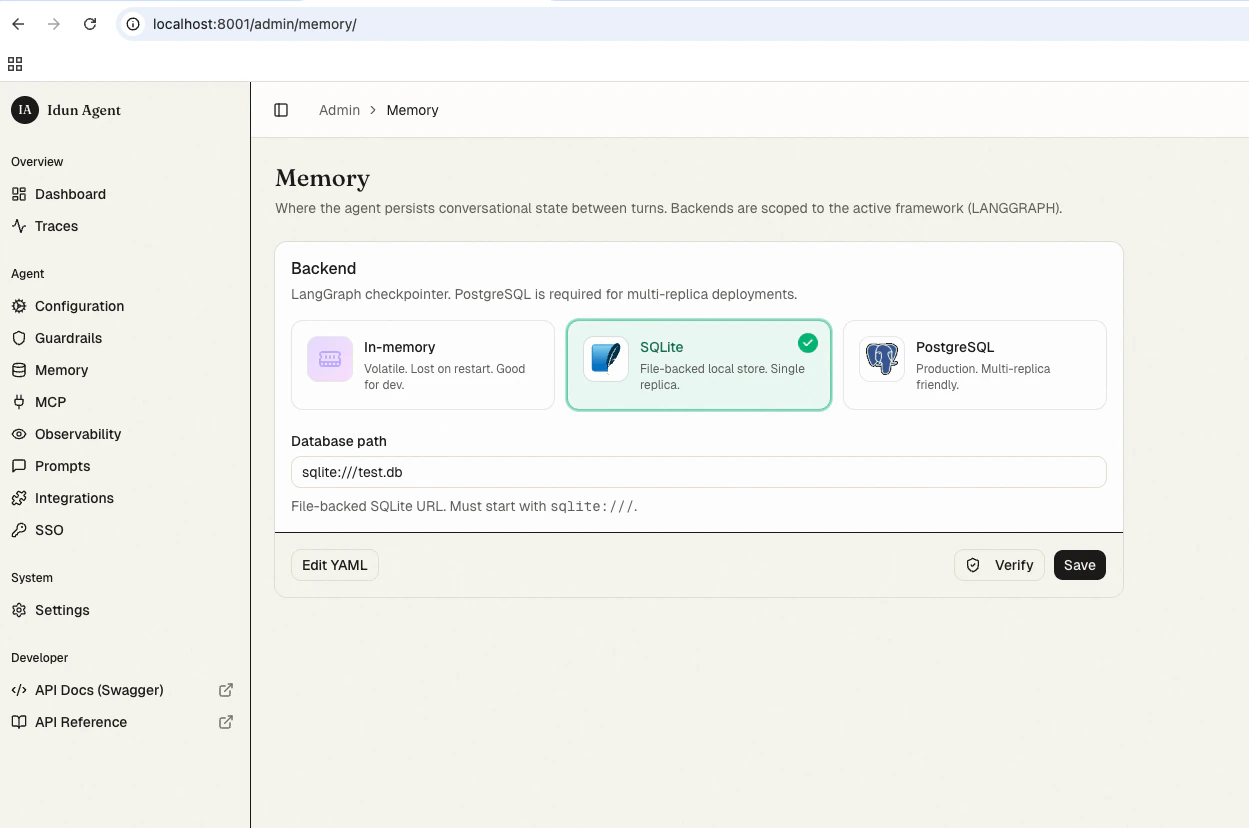 Field:
* **db\_url**: `sqlite:///./conversations.db` (a file next to the running process).
Save. The reload pipeline rebuilds the LangGraph checkpointer against SQLite. Every thread is now durable; restart `idun serve` and the next user message resumes the same conversation.
For production with multiple replicas, swap to `postgresql://...` in the same form. The agent code does not change.
Open `/admin/observability/` and click Langfuse.
Field:
* **db\_url**: `sqlite:///./conversations.db` (a file next to the running process).
Save. The reload pipeline rebuilds the LangGraph checkpointer against SQLite. Every thread is now durable; restart `idun serve` and the next user message resumes the same conversation.
For production with multiple replicas, swap to `postgresql://...` in the same form. The agent code does not change.
Open `/admin/observability/` and click Langfuse.
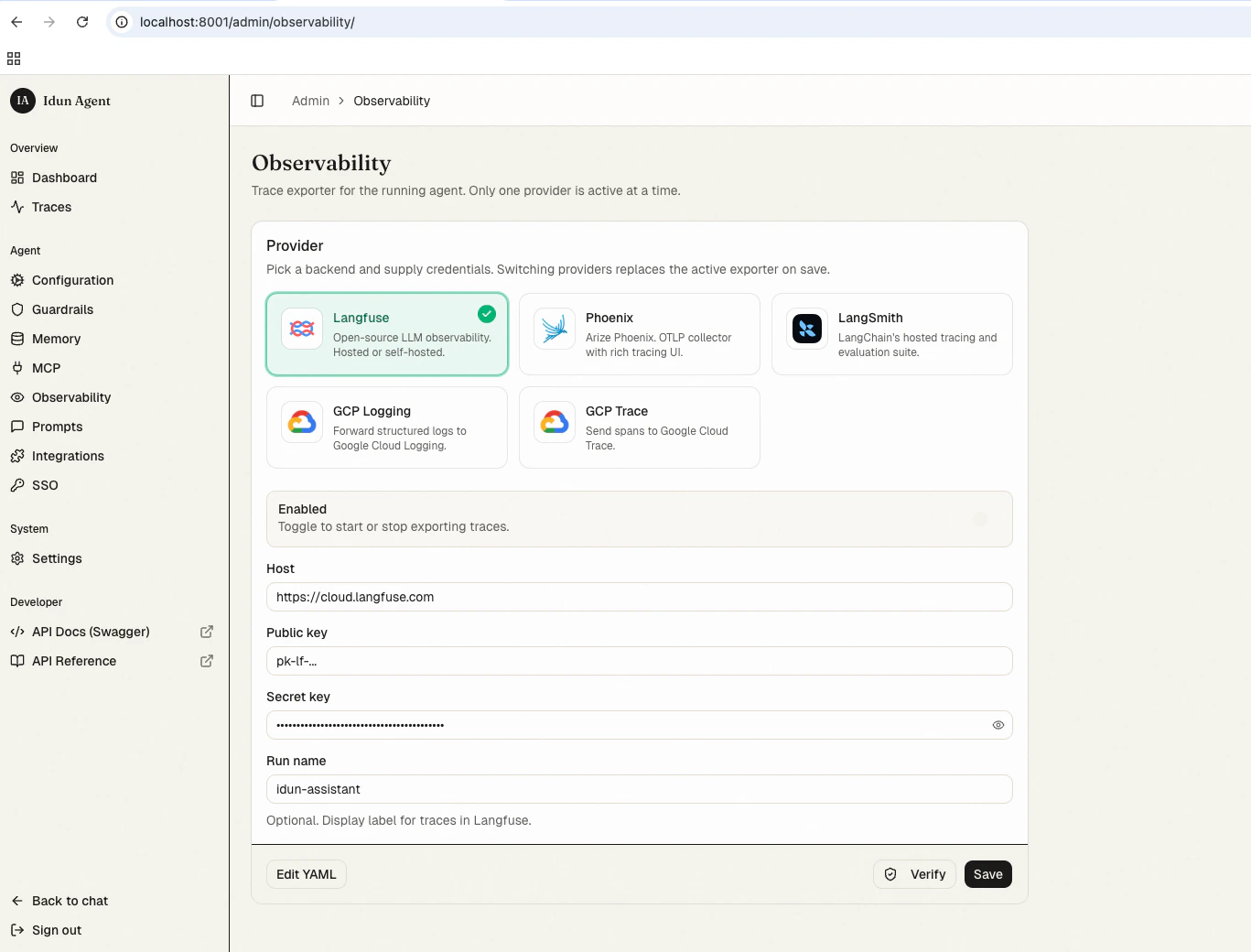 Fields:
* **Host**: `https://cloud.langfuse.com` (or your self-hosted URL)
* **Public key**: from your Langfuse project
* **Secret key**: from your Langfuse project
* **Run name**: `idun-assistant`
Save. The engine fans every span out to Langfuse alongside the local trace store at `/admin/traces/`. Same data, two surfaces.
idun-assistant is an internal tool. Anyone with an `@idun-group.com` Google account should be able to use it; no one else. Open `/admin/sso/` and configure Google OIDC with a domain allowlist.
Fields:
* **Host**: `https://cloud.langfuse.com` (or your self-hosted URL)
* **Public key**: from your Langfuse project
* **Secret key**: from your Langfuse project
* **Run name**: `idun-assistant`
Save. The engine fans every span out to Langfuse alongside the local trace store at `/admin/traces/`. Same data, two surfaces.
idun-assistant is an internal tool. Anyone with an `@idun-group.com` Google account should be able to use it; no one else. Open `/admin/sso/` and configure Google OIDC with a domain allowlist.
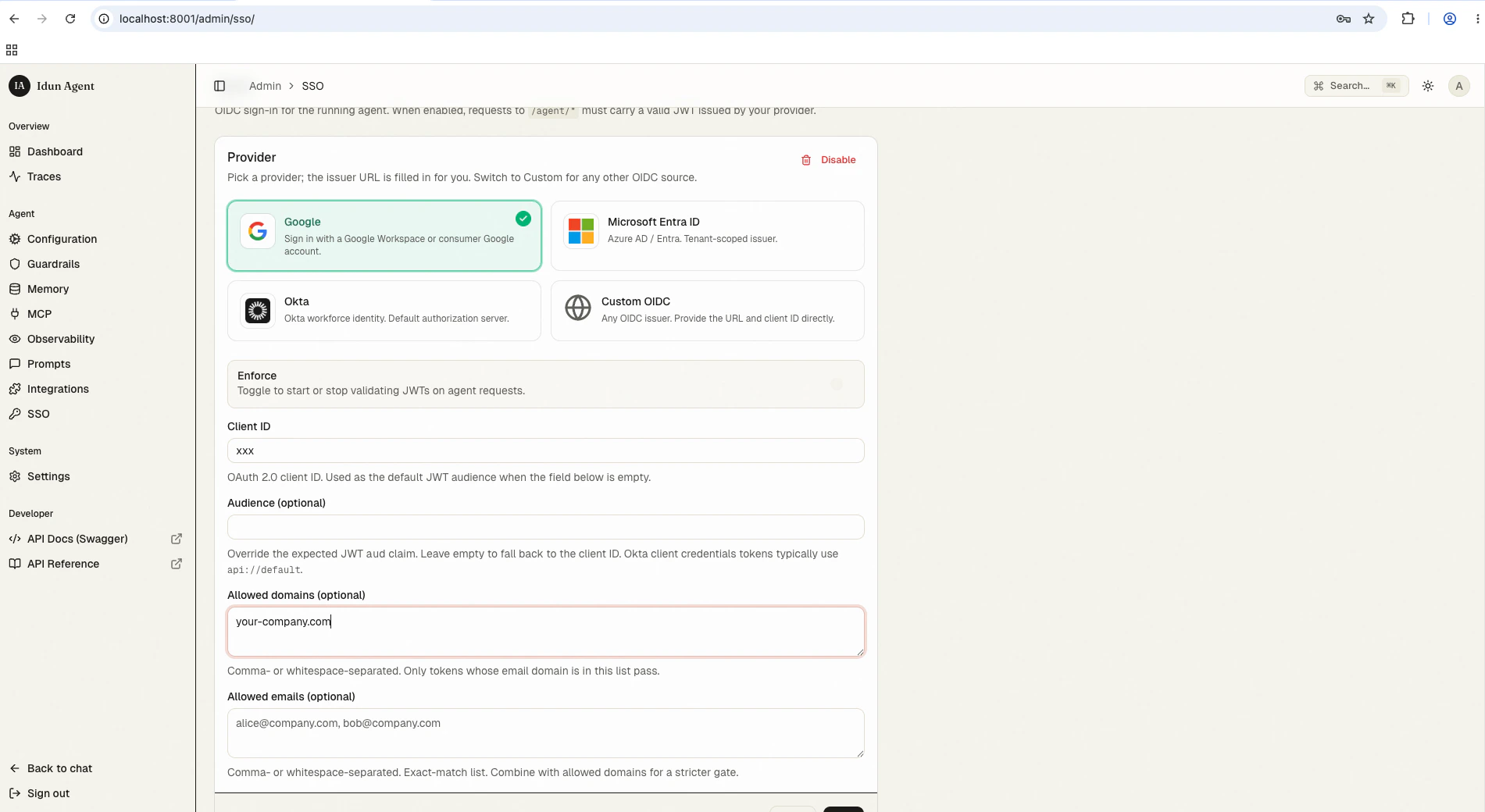 Fields:
* **Provider**: Google
* **Issuer**: `https://accounts.google.com`
* **Client ID**: the OAuth client ID from your Google Cloud project
* **Audience**: same value as Client ID (default)
* **Allowed domains**: `idun-group.com`
Save. From now on, every request to `/agent/run` (and the deprecated invoke/stream shims) requires a valid Google JWT whose `email` claim ends in `@idun-group.com`. The chat UI at `/` runs the OAuth handshake automatically and forwards the access token. See [SSO](/auth/sso) for the full validation flow and how to add specific outside emails to `allowed_emails`.
## Run the demo
Open `http://localhost:8000/`. Sign in with your Google account (the OAuth screen appears once and the cookie sticks for 24h). Send:
> Can you fetch the latest GitHub issues, make a summary in a Google Doc, and mail that to me?
Fields:
* **Provider**: Google
* **Issuer**: `https://accounts.google.com`
* **Client ID**: the OAuth client ID from your Google Cloud project
* **Audience**: same value as Client ID (default)
* **Allowed domains**: `idun-group.com`
Save. From now on, every request to `/agent/run` (and the deprecated invoke/stream shims) requires a valid Google JWT whose `email` claim ends in `@idun-group.com`. The chat UI at `/` runs the OAuth handshake automatically and forwards the access token. See [SSO](/auth/sso) for the full validation flow and how to add specific outside emails to `allowed_emails`.
## Run the demo
Open `http://localhost:8000/`. Sign in with your Google account (the OAuth screen appears once and the cookie sticks for 24h). Send:
> Can you fetch the latest GitHub issues, make a summary in a Google Doc, and mail that to me?
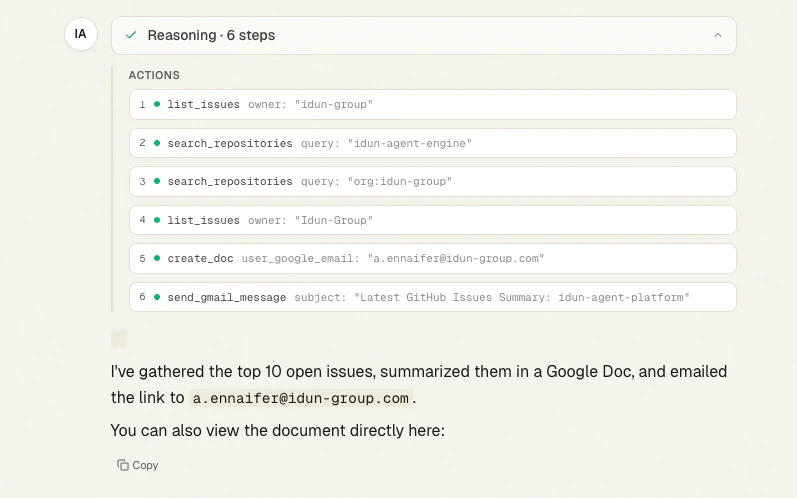 The bot streams partial output as the ReAct loop runs. Inline action cards show each call the model emits, the arguments it picks, and the result the tool returns. You also get a collapsed **Reasoning** card at the top with the agent's step-by-step plan. By the end of the chain, the agent has:
1. Called `list_issues` and `search_repositories` to find the right repo (`Idun-Group/idun-agent-platform`) and pull the top open issues.
2. Created a Google Doc with `create_doc`, summarizing the issues.
3. Sent the doc link via `send_gmail_message`.
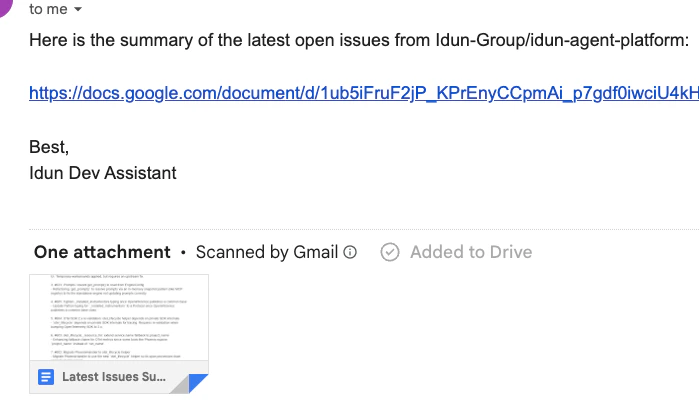
And in your inbox:
The bot streams partial output as the ReAct loop runs. Inline action cards show each call the model emits, the arguments it picks, and the result the tool returns. You also get a collapsed **Reasoning** card at the top with the agent's step-by-step plan. By the end of the chain, the agent has:
1. Called `list_issues` and `search_repositories` to find the right repo (`Idun-Group/idun-agent-platform`) and pull the top open issues.
2. Created a Google Doc with `create_doc`, summarizing the issues.
3. Sent the doc link via `send_gmail_message`.
And in your inbox:
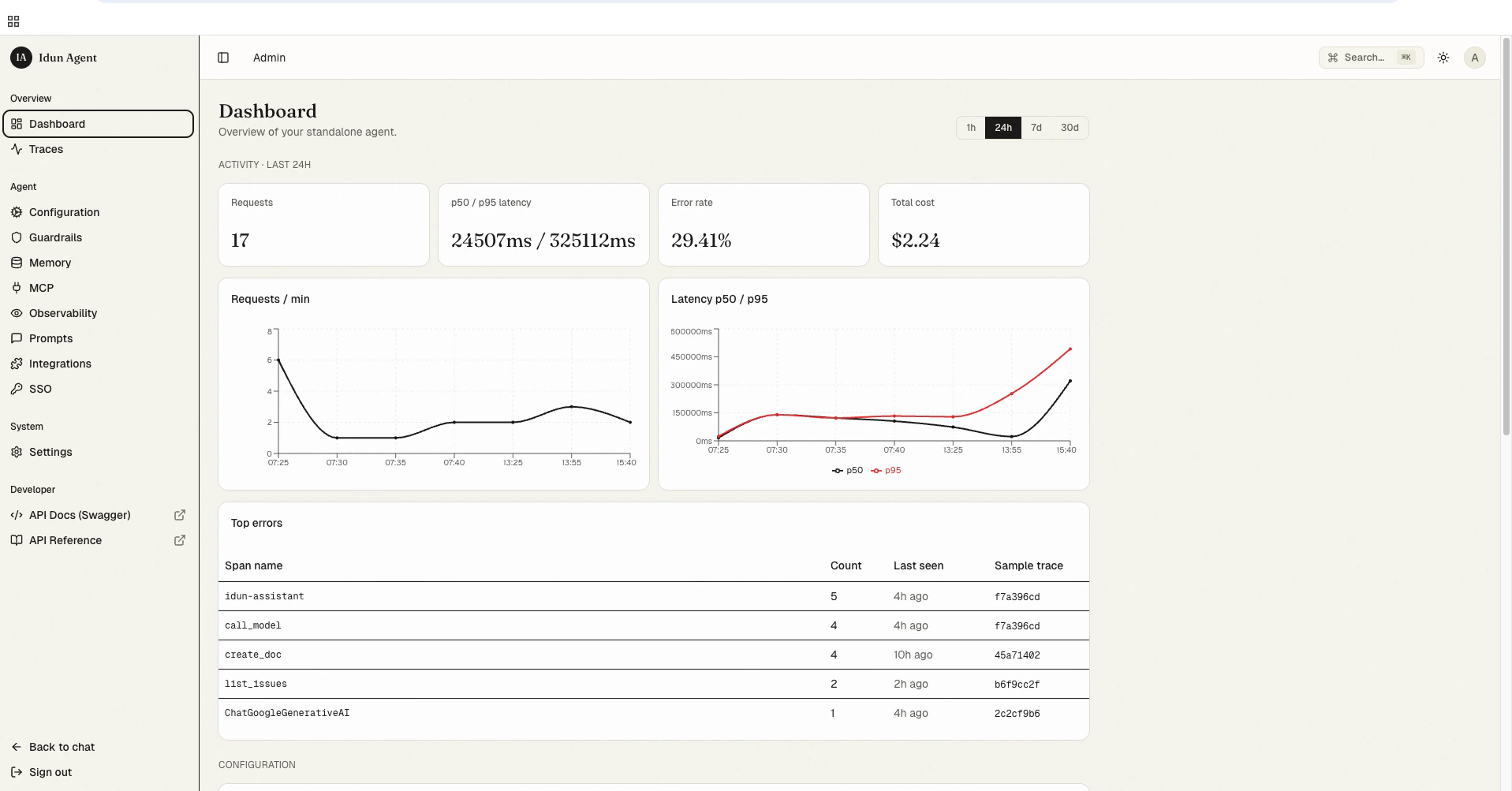
 Back in the admin panel, `/admin/` now reflects the run. Request count, p50/p95 latency, error rate, and total cost all roll up from the same `standalone_trace` rows the trace viewer reads.
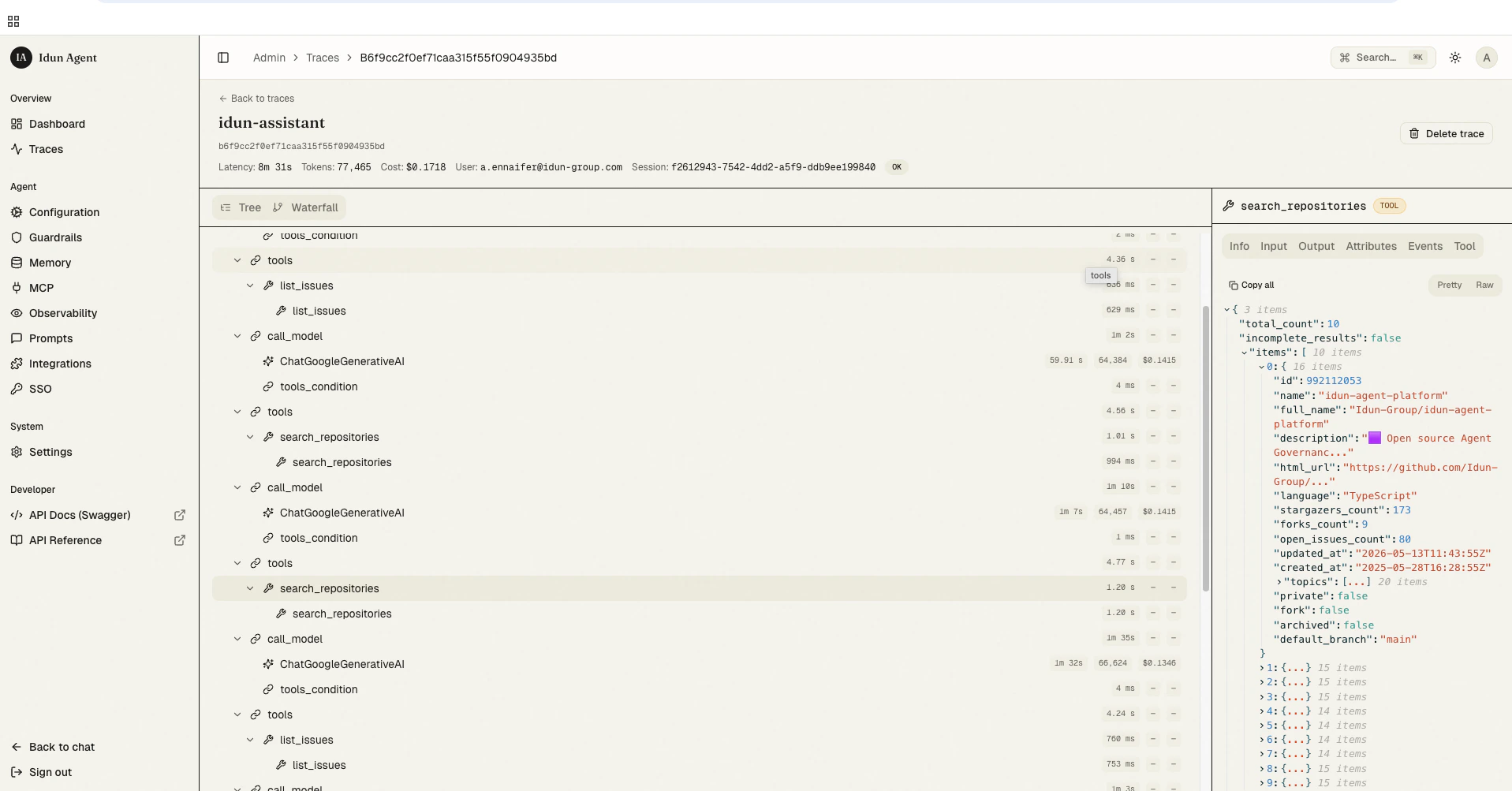
 For deeper debugging open `/admin/traces/` and click the run. You get the full span tree (every LLM call and every tool invocation) plus the exact JSON in/out of each tool in the right rail. Useful when the agent picks the wrong tool or passes weird arguments.
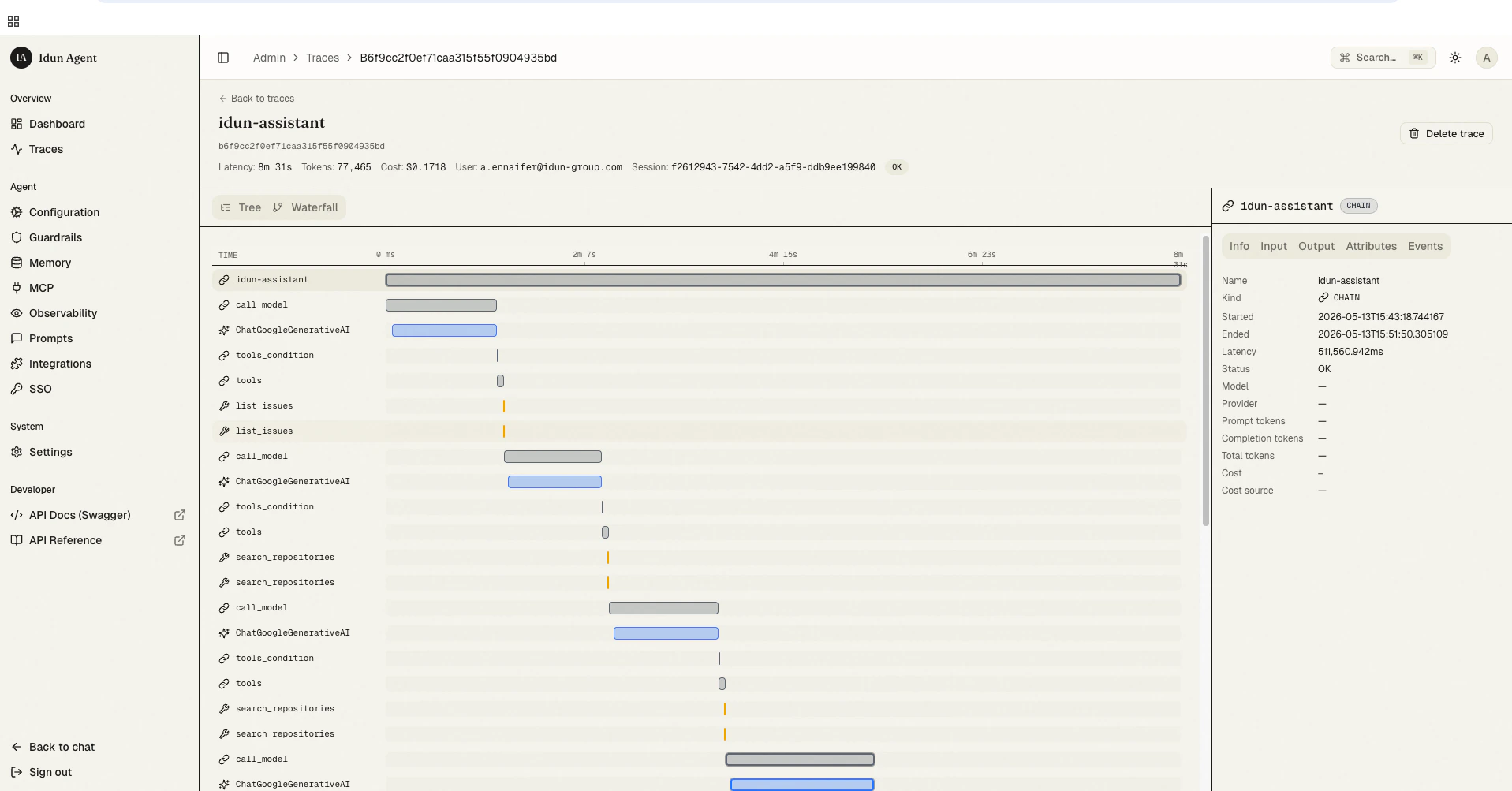
 Toggle to the **Waterfall** view to see where the time actually went. The critical path is highlighted, so you can spot the slow tool call at a glance.
 See [Local trace store](/observability/traces) for the trace UI reference.
## What's next
the full transport reference and how to register your own MCP server.
versioning, `get_prompt()` resolution, and the admin REST API.
when to swap SQLite for Postgres.
the bundled span-tree viewer at `/admin/traces/`.
provider presets, allowed\_domains + allowed\_emails, and how validation works.
See [Local trace store](/observability/traces) for the trace UI reference.
## What's next
the full transport reference and how to register your own MCP server.
versioning, `get_prompt()` resolution, and the admin REST API.
when to swap SQLite for Postgres.
the bundled span-tree viewer at `/admin/traces/`.
provider presets, allowed\_domains + allowed\_emails, and how validation works.