> ## Documentation Index
> Fetch the complete documentation index at: https://docs.idun-group.com/llms.txt
> Use this file to discover all available pages before exploring further.
# Langfuse
> Set up Langfuse observability to monitor, trace, and debug your agents in real time.
Set up Langfuse to trace agent execution and analyze performance in your Langfuse dashboard.
Before starting, complete the [quickstart guide](/quickstart) to have an agent running on Idun Engine.
## Set up Langfuse observability
If you do not have Langfuse API keys yet:
1. Go to [Langfuse Cloud](https://cloud.langfuse.com) or your [self-hosted](https://langfuse.com/self-hosting) instance
2. Sign up or log in to your account
3. Create a new project or select an existing one
4. Navigate to **Settings** > **API Keys**
5. Click **Create New API Key**
6. Copy the **Public Key** and **Secret Key**
Open the running standalone at `/admin/observability/` and click **Langfuse**. Fill in:
* **Host**: Your Langfuse instance URL (e.g., `https://cloud.langfuse.com` or your self-hosted URL)
* **Public key**: Langfuse public key (starts with `pk-lf-...`)
* **Secret key**: Langfuse secret key (starts with `sk-lf-...`)
* **Run name**: (Optional) Display label for traces in Langfuse (e.g., `my-agent`)
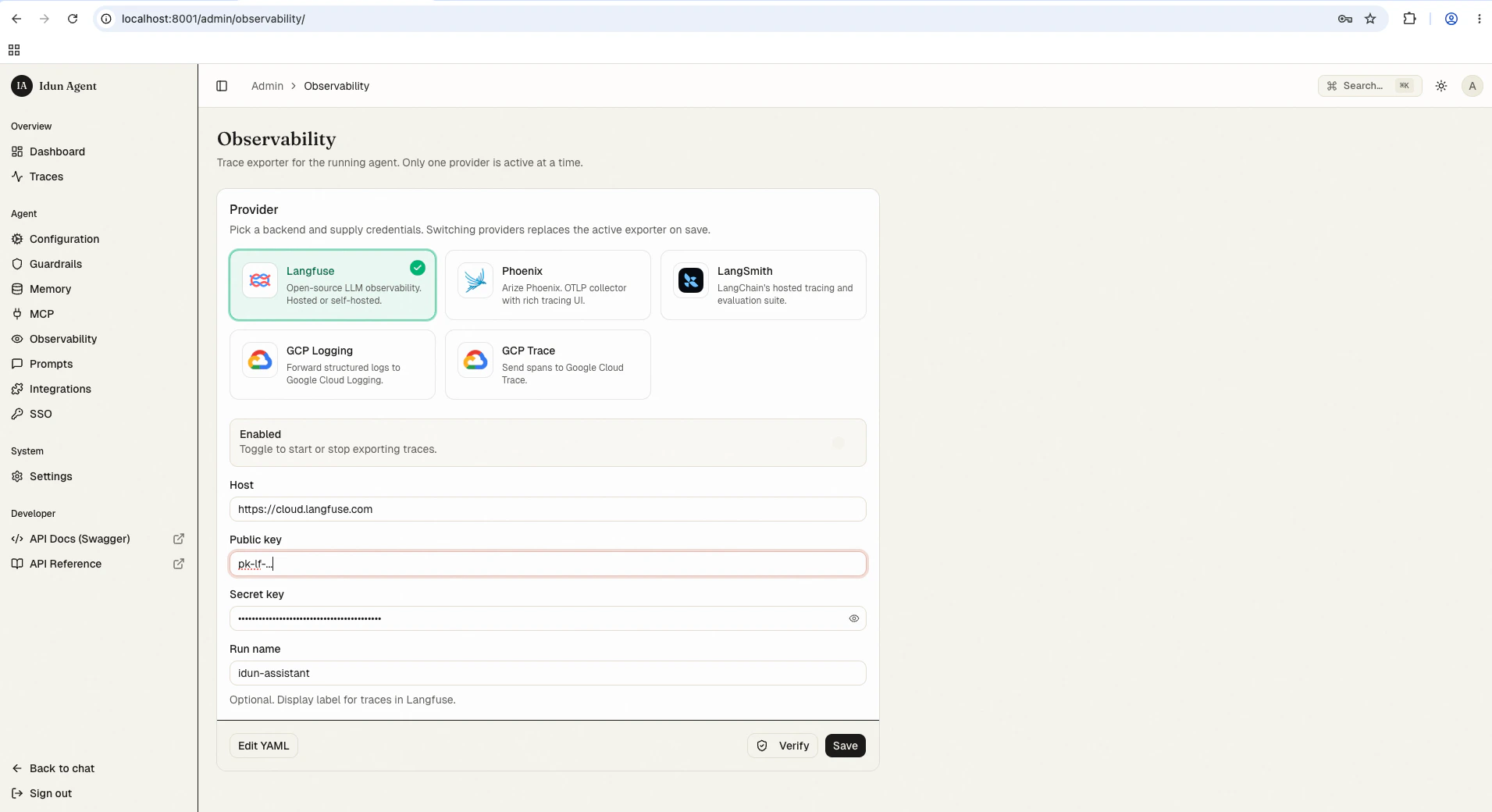 Save the form. The reload pipeline re-instantiates the engine; the next agent run starts streaming traces to Langfuse. Use the **Verify** button to test the connection.
Keep your secret key secure. Do not commit it to version control or share it publicly.
Alternatively, configure Langfuse in your `config.yaml` for first-boot seeding or engine-only mode:
```yaml config.yaml theme={"theme":{"light":"github-light","dark":"github-dark"}}
observability:
- provider: "LANGFUSE"
enabled: true
config:
host: "https://cloud.langfuse.com"
public_key: "${LANGFUSE_PUBLIC_KEY}"
secret_key: "${LANGFUSE_SECRET_KEY}"
run_name: "my-agent"
```
## View observability data
Once your agent is running with observability enabled:
1. Interact with your agent through the chat UI at `/` or the API at `/agent/run`
2. Open your Langfuse dashboard at [cloud.langfuse.com](https://cloud.langfuse.com)
3. Navigate to your project to view traces
You will see traces showing:
* Agent execution flow
* LLM calls and responses
* Tool usage and results
* Execution time and costs
* Error traces and debugging information
## Best practices
* Use descriptive names for observability configurations to identify them when managing multiple agents
* Enable observability during development to catch issues early
* Monitor costs through your Langfuse dashboard to track token usage
## Troubleshooting
ADK does not currently support simultaneous tracing with both Langfuse and GCP tracing. If you need this feature, open an issue on [GitHub](https://github.com/Idun-Group/idun-agent-platform/issues) or join the [Discord server](https://discord.gg/KCZ6nW2jQe).
1. **Check API keys**: Verify that your public and secret keys are correct
2. **Verify host URL**: Confirm the URL is accessible and correctly formatted
3. **Check agent logs**: Look for connection errors in the agent runtime logs
4. **Test connectivity**: Verify your agent can reach the Langfuse host
## Next steps
Inspect every agent run in the bundled admin UI alongside Langfuse.
Compare built-in providers and their configuration shapes.
Write a handler for any provider not on the shipping list.
Save the form. The reload pipeline re-instantiates the engine; the next agent run starts streaming traces to Langfuse. Use the **Verify** button to test the connection.
Keep your secret key secure. Do not commit it to version control or share it publicly.
Alternatively, configure Langfuse in your `config.yaml` for first-boot seeding or engine-only mode:
```yaml config.yaml theme={"theme":{"light":"github-light","dark":"github-dark"}}
observability:
- provider: "LANGFUSE"
enabled: true
config:
host: "https://cloud.langfuse.com"
public_key: "${LANGFUSE_PUBLIC_KEY}"
secret_key: "${LANGFUSE_SECRET_KEY}"
run_name: "my-agent"
```
## View observability data
Once your agent is running with observability enabled:
1. Interact with your agent through the chat UI at `/` or the API at `/agent/run`
2. Open your Langfuse dashboard at [cloud.langfuse.com](https://cloud.langfuse.com)
3. Navigate to your project to view traces
You will see traces showing:
* Agent execution flow
* LLM calls and responses
* Tool usage and results
* Execution time and costs
* Error traces and debugging information
## Best practices
* Use descriptive names for observability configurations to identify them when managing multiple agents
* Enable observability during development to catch issues early
* Monitor costs through your Langfuse dashboard to track token usage
## Troubleshooting
ADK does not currently support simultaneous tracing with both Langfuse and GCP tracing. If you need this feature, open an issue on [GitHub](https://github.com/Idun-Group/idun-agent-platform/issues) or join the [Discord server](https://discord.gg/KCZ6nW2jQe).
1. **Check API keys**: Verify that your public and secret keys are correct
2. **Verify host URL**: Confirm the URL is accessible and correctly formatted
3. **Check agent logs**: Look for connection errors in the agent runtime logs
4. **Test connectivity**: Verify your agent can reach the Langfuse host
## Next steps
Inspect every agent run in the bundled admin UI alongside Langfuse.
Compare built-in providers and their configuration shapes.
Write a handler for any provider not on the shipping list.