> ## Documentation Index
> Fetch the complete documentation index at: https://docs.idun-group.com/llms.txt
> Use this file to discover all available pages before exploring further.
# LangSmith
> Set up LangSmith observability to debug, test, evaluate, and monitor your agents.
Set up LangSmith to debug, trace, and monitor your agents from the LangSmith dashboard.
Before starting, complete the [quickstart guide](/quickstart) to have an agent running on Idun Engine.
## Set up LangSmith observability
If you do not have a LangSmith API key yet:
1. Go to [LangSmith](https://smith.langchain.com/)
2. Sign up or log in to your account
3. Navigate to **Settings** (gear icon) > **API Keys**
4. Click **Create API Key**
5. Copy your **API Key**
Open the running standalone at `/admin/observability/` and click **LangSmith**. Fill in:
* **API Key**: Your LangSmith API key (starts with `lsv2-...`)
* **Project Name**: The name of the project in LangSmith (for example, `default` or `prod-agent`)
* **Endpoint**: (Optional) Custom endpoint if you are self-hosting LangSmith (defaults to `https://api.smith.langchain.com`)
* **Run Name**: (Optional) Display name for each trace run in LangSmith (for example, `my-agent`)
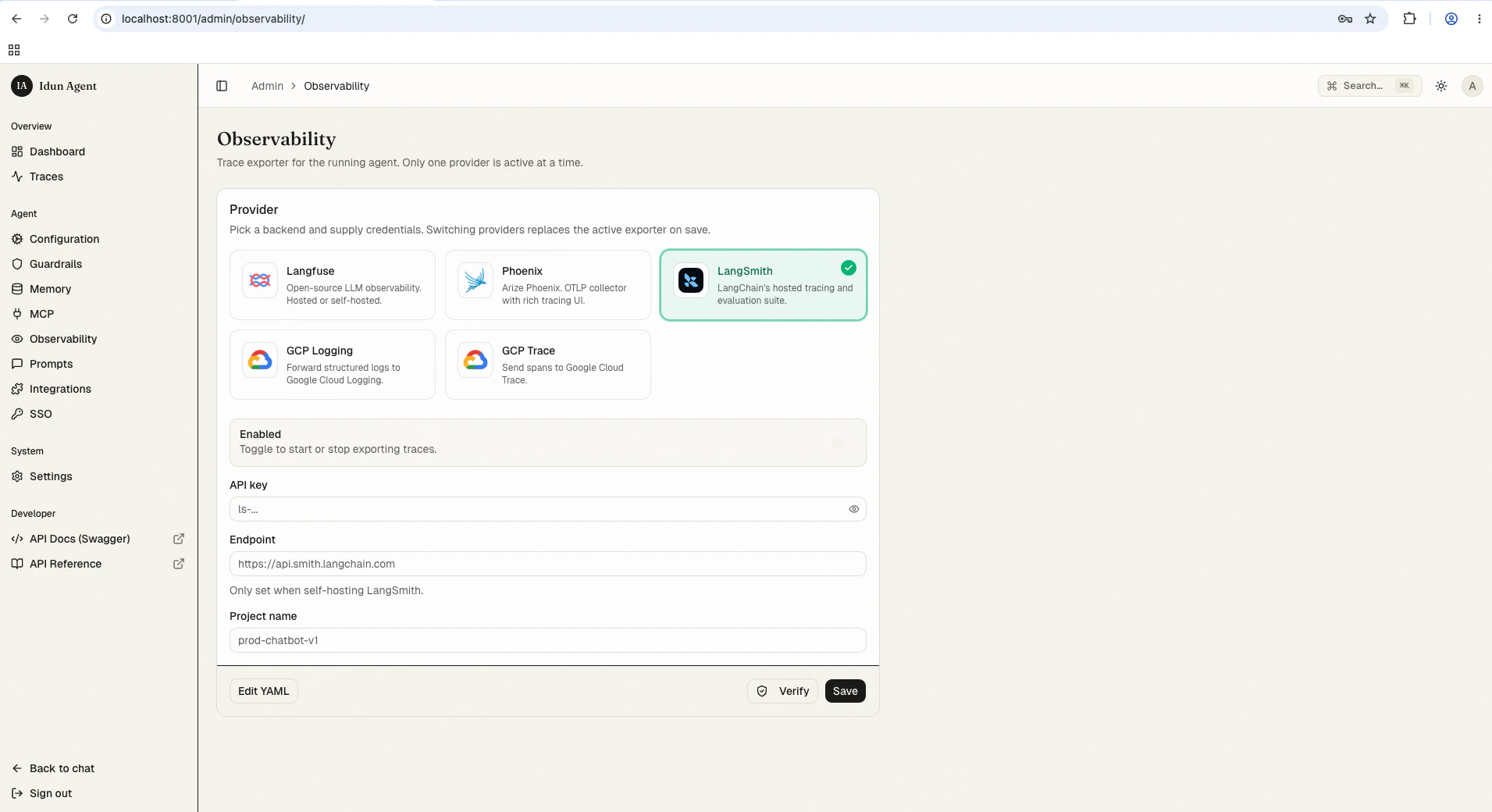 Save the form. The reload pipeline re-instantiates the engine with the new observability config; the next agent run starts streaming spans to LangSmith.
Keep your API key secure. Do not commit it to version control or share it publicly.
Alternatively, configure LangSmith in your `config.yaml` for first-boot seeding or engine-only mode:
```yaml config.yaml theme={"theme":{"light":"github-light","dark":"github-dark"}}
observability:
- provider: "LANGSMITH"
enabled: true
config:
api_key: "${LANGSMITH_API_KEY}"
project_name: "prod-agent"
run_name: "my-agent"
```
## View observability data
Once your agent is running with observability enabled:
1. Interact with your agent through the chat UI at `/` or the API at `/agent/run`
2. Open your LangSmith dashboard at [smith.langchain.com](https://smith.langchain.com/)
3. Navigate to your project to view traces
You will see traces showing the execution run tree, LLM inputs/outputs, and latency. Each trace run is named after your agent by default.
## Best practices
* Use distinct projects for development and production environments
* Tag runs to filter traces when investigating specific issues (configured within agent logic)
* Review error traces in LangSmith to identify and resolve problems quickly
## Troubleshooting
1. **Check API key**: Verify it is valid and has the required permissions
2. **Verify project name**: Traces are sent to the "default" project if the project name is not specified or is incorrect
3. **Check tracing toggle**: Confirm the tracing toggle is enabled in the configuration
## Next steps
Inspect every agent run in the bundled admin UI alongside LangSmith.
Compare built-in providers and their configuration shapes.
Write a handler for any provider not on the shipping list.
Save the form. The reload pipeline re-instantiates the engine with the new observability config; the next agent run starts streaming spans to LangSmith.
Keep your API key secure. Do not commit it to version control or share it publicly.
Alternatively, configure LangSmith in your `config.yaml` for first-boot seeding or engine-only mode:
```yaml config.yaml theme={"theme":{"light":"github-light","dark":"github-dark"}}
observability:
- provider: "LANGSMITH"
enabled: true
config:
api_key: "${LANGSMITH_API_KEY}"
project_name: "prod-agent"
run_name: "my-agent"
```
## View observability data
Once your agent is running with observability enabled:
1. Interact with your agent through the chat UI at `/` or the API at `/agent/run`
2. Open your LangSmith dashboard at [smith.langchain.com](https://smith.langchain.com/)
3. Navigate to your project to view traces
You will see traces showing the execution run tree, LLM inputs/outputs, and latency. Each trace run is named after your agent by default.
## Best practices
* Use distinct projects for development and production environments
* Tag runs to filter traces when investigating specific issues (configured within agent logic)
* Review error traces in LangSmith to identify and resolve problems quickly
## Troubleshooting
1. **Check API key**: Verify it is valid and has the required permissions
2. **Verify project name**: Traces are sent to the "default" project if the project name is not specified or is incorrect
3. **Check tracing toggle**: Confirm the tracing toggle is enabled in the configuration
## Next steps
Inspect every agent run in the bundled admin UI alongside LangSmith.
Compare built-in providers and their configuration shapes.
Write a handler for any provider not on the shipping list.