> ## Documentation Index
> Fetch the complete documentation index at: https://docs.idun-group.com/llms.txt
> Use this file to discover all available pages before exploring further.
# Prompts
> Version, store, and render prompt templates with Jinja2 variables. Edit them from the admin panel or seed from YAML.
Prompt management lets you version, store, and render prompt templates without hardcoding them in agent code. Define them in `config.yaml` (the seed shape) or edit them through the standalone admin panel at `/admin/prompts/`. Prompts support Jinja2 variables (`{{ variable }}`) for dynamic content at runtime.
## Key concepts
| Concept | Description |
| -------------- | ------------------------------------------------------------------------------------------------------------------------ |
| **Prompt ID** | A logical name for a prompt family (e.g., `system-prompt`, `rag-query`). |
| **Versions** | Each prompt ID can have multiple versions. Content is immutable after creation. Updating a prompt creates a new version. |
| **Latest tag** | The `latest` tag always points to the highest version and is managed automatically. |
| **Tags** | Free-form labels (`production`, `staging`, `reviewed`) plus the managed `latest`. |
## Define prompts
```yaml config.yaml theme={"theme":{"light":"github-light","dark":"github-dark"}}
prompts:
- prompt_id: "system-prompt"
version: 1
content: "You are a helpful assistant specializing in {{ domain }}."
tags: ["latest"]
- prompt_id: "rag-query"
version: 1
content: |
Answer the question based on the following context.
Context: {{ context }}
Question: {{ query }}
tags: ["latest"]
```
| Field | Type | Description |
| ----------- | -------------- | ----------------------------------------------------------------------- |
| `prompt_id` | `string` | Logical identifier for the prompt family. |
| `version` | `integer` | Version number. Auto-incremented per `prompt_id` on admin-API writes. |
| `content` | `string` | Prompt text, supports Jinja2 `{{ variables }}`. Immutable once created. |
| `tags` | `list[string]` | Free-form labels. `latest` is server-managed. |
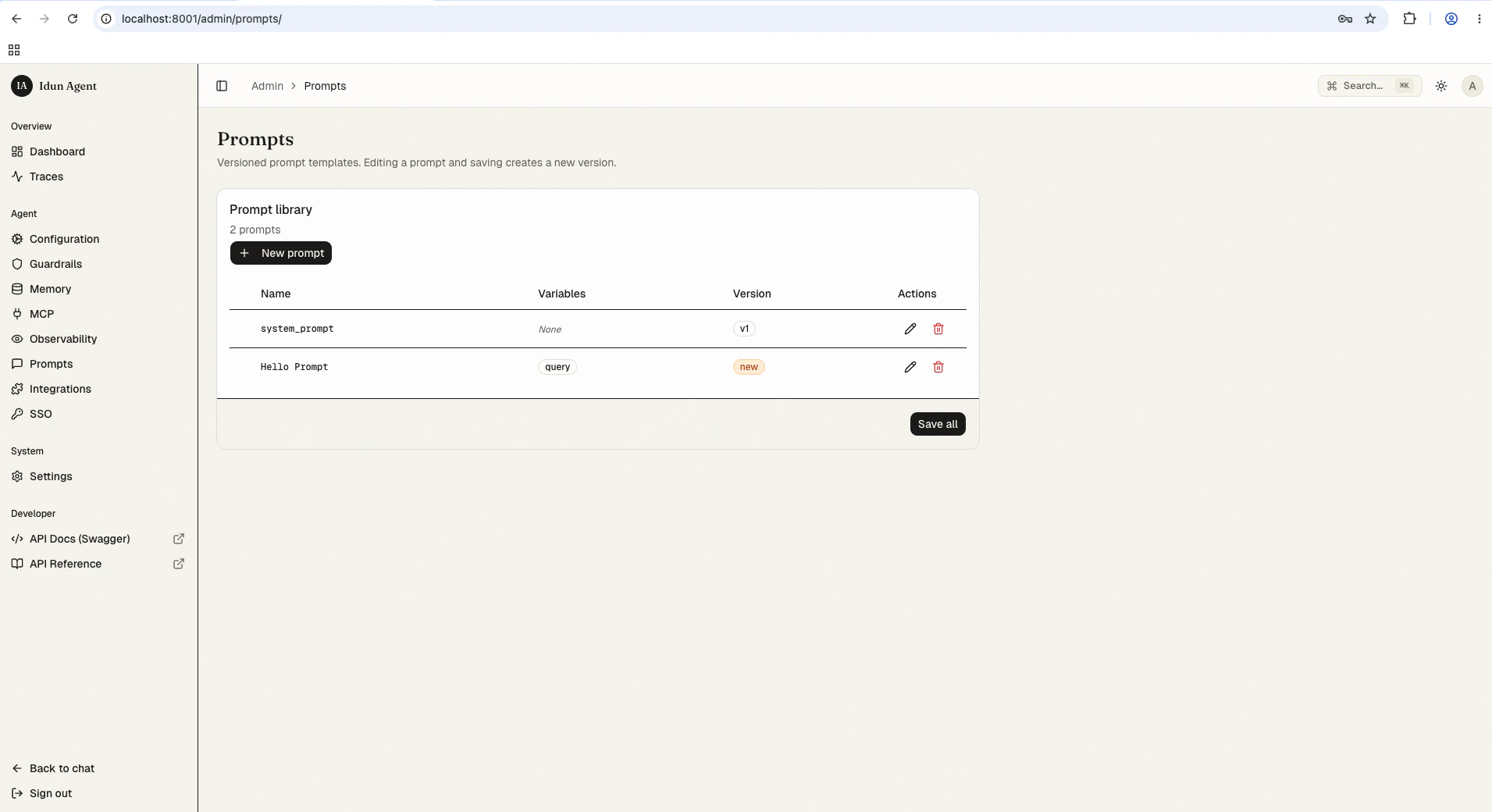
Navigate to `/admin/prompts/` in the running standalone. The Prompt library lists every version with its variables, version number, and a row of actions.
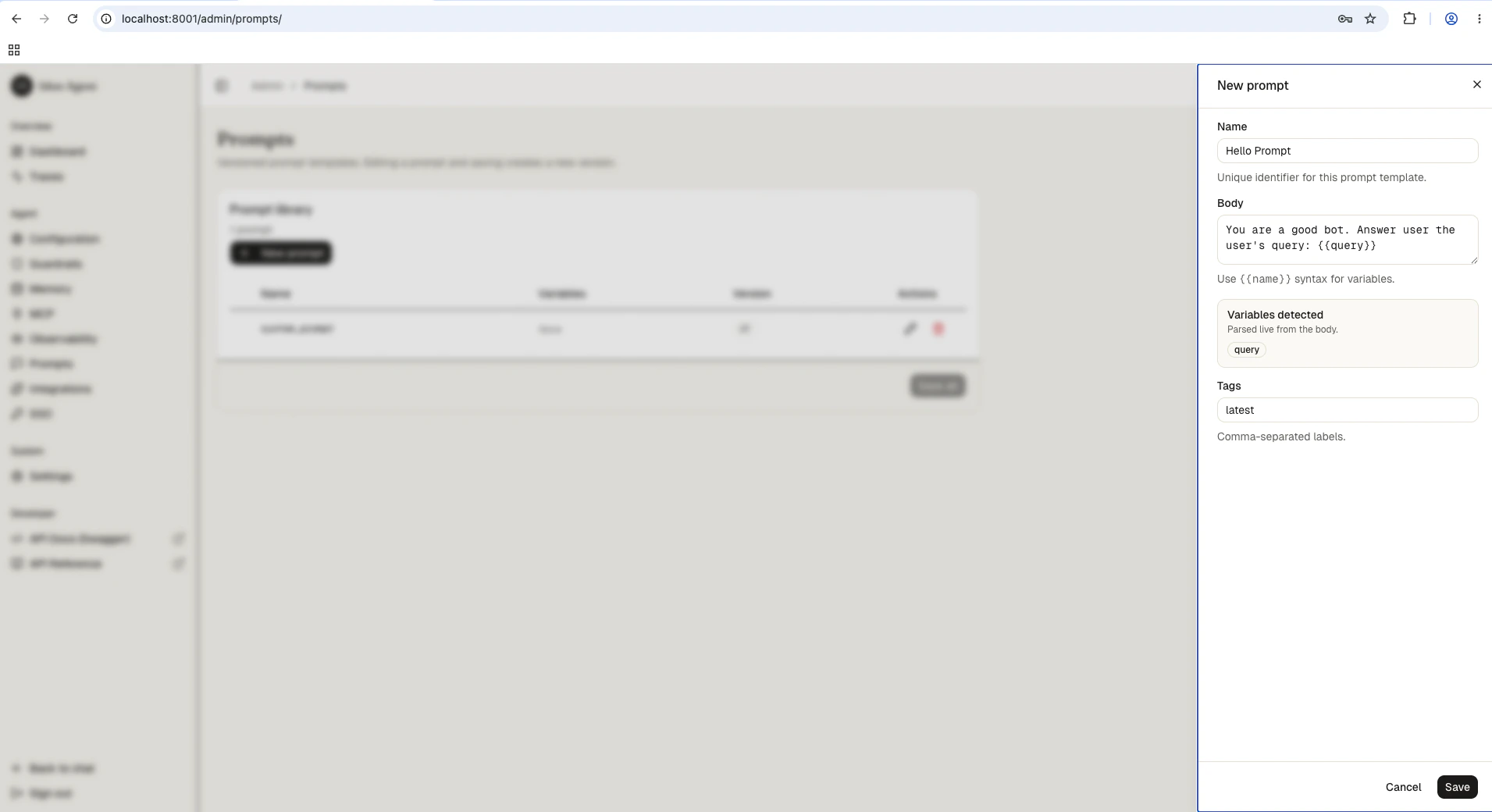
 Click **New prompt**. Give it a unique `Name` (prompt ID), write the `Body` using `{{ name }}` syntax for variables, optionally add tags. The right panel surfaces detected variables as you type.
 Save. The reload pipeline re-instantiates the engine with the new prompt available to `get_prompt()`. Subsequent saves with the same name allocate the next version automatically.
## Admin REST API
The standalone exposes the same operations at `/admin/api/v1/prompts/`. All routes require an authenticated admin session (the cookie set by `/admin/api/v1/auth/login`).
Set two shell variables once and the snippets below run as-is:
```bash theme={"theme":{"light":"github-light","dark":"github-dark"}}
# Capture the session cookie after `/admin/api/v1/auth/login` (e.g., copy from your browser's devtools).
SESSION_COOKIE='your-session-cookie-value'
# The integer row id for an existing prompt version.
PROMPT_ROW_ID=123
```
### List versions
```curl theme={"theme":{"light":"github-light","dark":"github-dark"}}
curl "http://localhost:8000/admin/api/v1/prompts" \
-b "idun_session=${SESSION_COOKIE}"
```
Returns every prompt version ordered by `prompt_id` then `version DESC`.
### Create a new version
```curl theme={"theme":{"light":"github-light","dark":"github-dark"}}
curl -X POST "http://localhost:8000/admin/api/v1/prompts" \
-H "Content-Type: application/json" \
-b "idun_session=${SESSION_COOKIE}" \
-d '{
"prompt_id": "system-prompt",
"content": "You are a helpful assistant for {{ domain }}.",
"tags": ["production"]
}'
```
The first write for a given `prompt_id` is version 1. Subsequent POSTs with the same `prompt_id` allocate the next version and move the `latest` tag onto the new row. The write triggers the reload pipeline; the response includes the new row plus the reload outcome.
### Update tags
Content is immutable. Only tags can be patched:
```curl theme={"theme":{"light":"github-light","dark":"github-dark"}}
curl -X PATCH "http://localhost:8000/admin/api/v1/prompts/${PROMPT_ROW_ID}" \
-H "Content-Type: application/json" \
-b "idun_session=${SESSION_COOKIE}" \
-d '{"tags": ["production", "reviewed"]}'
```
The `latest` tag is managed server-side. Removing it from a PATCH body is a no-op if the row is still the highest version; you cannot assign `latest` to an older version manually.
### Delete a version
```curl theme={"theme":{"light":"github-light","dark":"github-dark"}}
curl -X DELETE "http://localhost:8000/admin/api/v1/prompts/${PROMPT_ROW_ID}" \
-b "idun_session=${SESSION_COOKIE}"
```
If the deleted row carried `latest`, the tag is automatically promoted onto the next-highest remaining version of the same `prompt_id`.
## Using prompts in agent code
```python theme={"theme":{"light":"github-light","dark":"github-dark"}}
from idun_agent_engine.prompts import get_prompt
prompt = get_prompt("system-prompt")
rendered = prompt.format(domain="healthcare")
# "You are a helpful assistant specializing in healthcare."
```
Resolution order:
1. Explicit `config_path` argument.
2. The standalone's in-process snapshot (set by the reload pipeline; covers the admin-UI / REST path).
3. `IDUN_CONFIG_PATH` YAML file (engine-only mode).
`format()` uses Jinja2 strict mode. Missing variables raise a `ValueError` with a message including the prompt ID and version.
### LangChain integration
Convert a prompt to a LangChain `PromptTemplate`:
```python theme={"theme":{"light":"github-light","dark":"github-dark"}}
prompt = get_prompt("rag-query")
lc_prompt = prompt.to_langchain()
result = lc_prompt.format(context="AI is...", query="What is AI?")
```
`to_langchain()` requires `langchain-core`. Install it with `pip install langchain-core`.
## Best practices
* Use descriptive prompt IDs like `system-prompt`, `rag-query`, `summarization` (not `prompt-1`).
* Keep prompts atomic: one prompt per concern (system instructions, query template, output format).
* Create new versions for meaningful changes, not typo fixes.
* Use tags like `production`, `staging`, `experimental` to track lifecycle.
* Pin specific versions in your agent code rather than always resolving against `latest`.
## Troubleshooting
1. Confirm the prompt exists at `/admin/prompts/` (or in the YAML you bootstrapped from).
2. If you just created it via REST, the reload pipeline must complete before `get_prompt()` sees it; check the response's `reload.status` field.
3. In engine-only mode, verify `IDUN_CONFIG_PATH` points at a YAML containing the prompt.
1. Use double braces: `{{ variable }}`, not `{ variable }`.
2. Pass all required variables to `format()`.
3. The error message includes the prompt ID and version to help identify the issue.
Auto-increment is scoped per `prompt_id`. Creating a version with a different `prompt_id` starts at 1.
Save. The reload pipeline re-instantiates the engine with the new prompt available to `get_prompt()`. Subsequent saves with the same name allocate the next version automatically.
## Admin REST API
The standalone exposes the same operations at `/admin/api/v1/prompts/`. All routes require an authenticated admin session (the cookie set by `/admin/api/v1/auth/login`).
Set two shell variables once and the snippets below run as-is:
```bash theme={"theme":{"light":"github-light","dark":"github-dark"}}
# Capture the session cookie after `/admin/api/v1/auth/login` (e.g., copy from your browser's devtools).
SESSION_COOKIE='your-session-cookie-value'
# The integer row id for an existing prompt version.
PROMPT_ROW_ID=123
```
### List versions
```curl theme={"theme":{"light":"github-light","dark":"github-dark"}}
curl "http://localhost:8000/admin/api/v1/prompts" \
-b "idun_session=${SESSION_COOKIE}"
```
Returns every prompt version ordered by `prompt_id` then `version DESC`.
### Create a new version
```curl theme={"theme":{"light":"github-light","dark":"github-dark"}}
curl -X POST "http://localhost:8000/admin/api/v1/prompts" \
-H "Content-Type: application/json" \
-b "idun_session=${SESSION_COOKIE}" \
-d '{
"prompt_id": "system-prompt",
"content": "You are a helpful assistant for {{ domain }}.",
"tags": ["production"]
}'
```
The first write for a given `prompt_id` is version 1. Subsequent POSTs with the same `prompt_id` allocate the next version and move the `latest` tag onto the new row. The write triggers the reload pipeline; the response includes the new row plus the reload outcome.
### Update tags
Content is immutable. Only tags can be patched:
```curl theme={"theme":{"light":"github-light","dark":"github-dark"}}
curl -X PATCH "http://localhost:8000/admin/api/v1/prompts/${PROMPT_ROW_ID}" \
-H "Content-Type: application/json" \
-b "idun_session=${SESSION_COOKIE}" \
-d '{"tags": ["production", "reviewed"]}'
```
The `latest` tag is managed server-side. Removing it from a PATCH body is a no-op if the row is still the highest version; you cannot assign `latest` to an older version manually.
### Delete a version
```curl theme={"theme":{"light":"github-light","dark":"github-dark"}}
curl -X DELETE "http://localhost:8000/admin/api/v1/prompts/${PROMPT_ROW_ID}" \
-b "idun_session=${SESSION_COOKIE}"
```
If the deleted row carried `latest`, the tag is automatically promoted onto the next-highest remaining version of the same `prompt_id`.
## Using prompts in agent code
```python theme={"theme":{"light":"github-light","dark":"github-dark"}}
from idun_agent_engine.prompts import get_prompt
prompt = get_prompt("system-prompt")
rendered = prompt.format(domain="healthcare")
# "You are a helpful assistant specializing in healthcare."
```
Resolution order:
1. Explicit `config_path` argument.
2. The standalone's in-process snapshot (set by the reload pipeline; covers the admin-UI / REST path).
3. `IDUN_CONFIG_PATH` YAML file (engine-only mode).
`format()` uses Jinja2 strict mode. Missing variables raise a `ValueError` with a message including the prompt ID and version.
### LangChain integration
Convert a prompt to a LangChain `PromptTemplate`:
```python theme={"theme":{"light":"github-light","dark":"github-dark"}}
prompt = get_prompt("rag-query")
lc_prompt = prompt.to_langchain()
result = lc_prompt.format(context="AI is...", query="What is AI?")
```
`to_langchain()` requires `langchain-core`. Install it with `pip install langchain-core`.
## Best practices
* Use descriptive prompt IDs like `system-prompt`, `rag-query`, `summarization` (not `prompt-1`).
* Keep prompts atomic: one prompt per concern (system instructions, query template, output format).
* Create new versions for meaningful changes, not typo fixes.
* Use tags like `production`, `staging`, `experimental` to track lifecycle.
* Pin specific versions in your agent code rather than always resolving against `latest`.
## Troubleshooting
1. Confirm the prompt exists at `/admin/prompts/` (or in the YAML you bootstrapped from).
2. If you just created it via REST, the reload pipeline must complete before `get_prompt()` sees it; check the response's `reload.status` field.
3. In engine-only mode, verify `IDUN_CONFIG_PATH` points at a YAML containing the prompt.
1. Use double braces: `{{ variable }}`, not `{ variable }`.
2. Pass all required variables to `format()`.
3. The error message includes the prompt ID and version to help identify the issue.
Auto-increment is scoped per `prompt_id`. Creating a version with a different `prompt_id` starts at 1.