> ## Documentation Index
> Fetch the complete documentation index at: https://docs.idun-group.com/llms.txt
> Use this file to discover all available pages before exploring further.
# Overview
> A self-sufficient single-agent deployment with embedded chat UI, admin panel, and traces viewer.
**Idun Agent Standalone** packages one agent into a single FastAPI process — chat UI, admin panel, traces viewer, and a local DB included. Deploy on Google Cloud Run, a VM, or your laptop.
## What you get
* **Chat UI** at `/`, themeable, AG-UI streaming, three layout variants (branded / minimal / inspector).
* **Admin panel** at `/admin/`, edit agent config, guardrails, MCP servers, prompts, observability, integrations, and theme. Hot-reload of the running agent on save.
* **Dashboard** at `/admin/`, live activity stats sourced from the local trace store: request count, p50/p95 latency, error rate, total cost, traffic sparkline, top errors.
* **First-party traces** at `/admin/traces/`, every AG-UI run event captured locally; debug an agent without external observability.
* **Single Docker image**, single Python process. SQLite by default; Postgres for production.
## When to use it
* You ship ONE agent and don't need the governance hub.
* You want to iterate on an agent locally with the full Idun stack — not just the engine SDK.
* You want a branded chat UI without writing a frontend.
## When NOT to use it
* You have your own admin stack and only want the runtime layer. Use [engine-only mode](/cli/overview) with `idun agent serve --source file --path config.yaml` instead.
* You're running multiple agents per host. Standalone is single-agent, single-tenant; run one process per agent.
## Architecture in 60 seconds
The standalone wraps `idun-agent-engine` in a single FastAPI process. The engine still runs the agent and serves `/agent/run`. The standalone adds the chat UI, the admin REST surface, the trace store, password auth, and a hot-reload pipeline that rebuilds the engine on every admin write.
```mermaid theme={"theme":{"light":"github-light","dark":"github-dark"}}
flowchart LR
Browser --> App["FastAPI process"]
App --> UI["/
chat + admin + traces"]
App --> Agent["/agent/*
engine routes"]
App --> AdminAPI["/admin/api/v1/*
admin REST + auth"]
AdminAPI --> DB[(SQLite or Postgres)]
Agent --> DB
```
Spans flow into `standalone_trace` + `standalone_span` tables via an OTel exporter the standalone attaches at boot, and the admin UI reads them back through the same REST surface.
## Dashboard
The admin panel opens on a dashboard sourced from the trace store. It refreshes every time you reload and gives you a single-pane view of whether the agent is healthy.
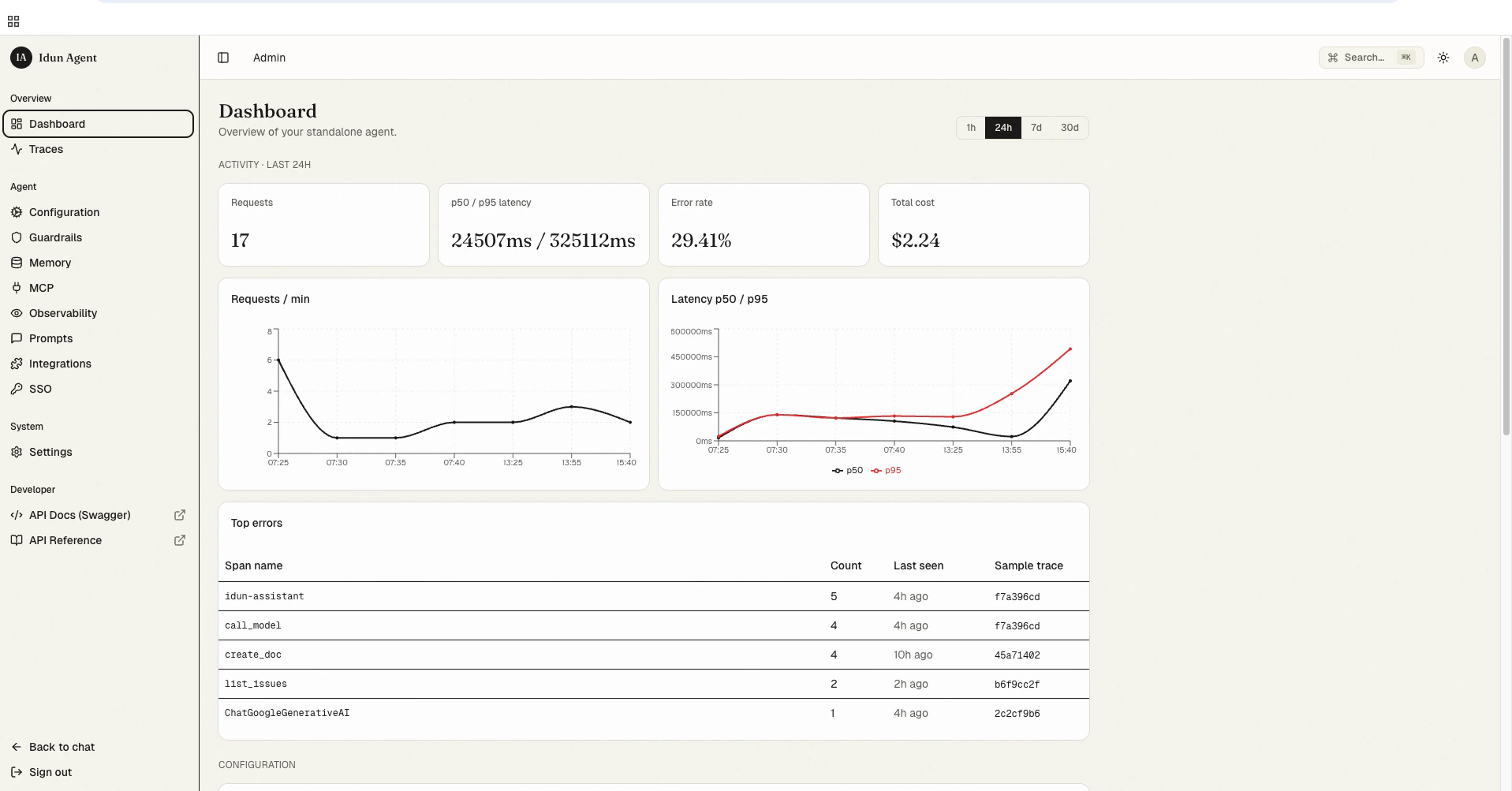 Default panels:
* **Activity (24h / 7d / 30d toggle)**: total requests, p50/p95 latency, error rate, total cost across the window.
* **Requests / min**: a sparkline of traffic over the window. Spikes here pair with spikes in the latency chart so you can spot saturation.
* **Latency p50 / p95**: two-line chart over the window.
* **Top errors**: a leaderboard of failing span names with a count, last-seen timestamp, and a one-click link into the offending trace.
All of it reads from `standalone_trace` + `standalone_span` directly. No external observability provider needed.
## Next steps
Get the standalone running locally with your first agent.
How saves validate, hot-reload, and roll back without a process restart.
Every flag of `idun` and the supporting commands.
Deploy the standalone to Google Cloud Run.
Theme the chat UI and pick a layout variant.
Default panels:
* **Activity (24h / 7d / 30d toggle)**: total requests, p50/p95 latency, error rate, total cost across the window.
* **Requests / min**: a sparkline of traffic over the window. Spikes here pair with spikes in the latency chart so you can spot saturation.
* **Latency p50 / p95**: two-line chart over the window.
* **Top errors**: a leaderboard of failing span names with a count, last-seen timestamp, and a one-click link into the offending trace.
All of it reads from `standalone_trace` + `standalone_span` directly. No external observability provider needed.
## Next steps
Get the standalone running locally with your first agent.
How saves validate, hot-reload, and roll back without a process restart.
Every flag of `idun` and the supporting commands.
Deploy the standalone to Google Cloud Run.
Theme the chat UI and pick a layout variant.