

Prerequisites
- A running Idun agent (engine)
- An Azure tenant where you can register an application
- Your engine must be publicly reachable (use ngrok or Bot Framework’s tunnel for local development)
Setup
- Admin UI
- Config file
1
Open the integrations admin page
Navigate to
/admin/integrations/ in the running standalone. The channel catalog shows WhatsApp, Discord, Google Chat, Slack, and Microsoft Teams as active channels.2
Create the Teams integration
Click Microsoft Teams and fill in the credentials from your Azure AD app registration.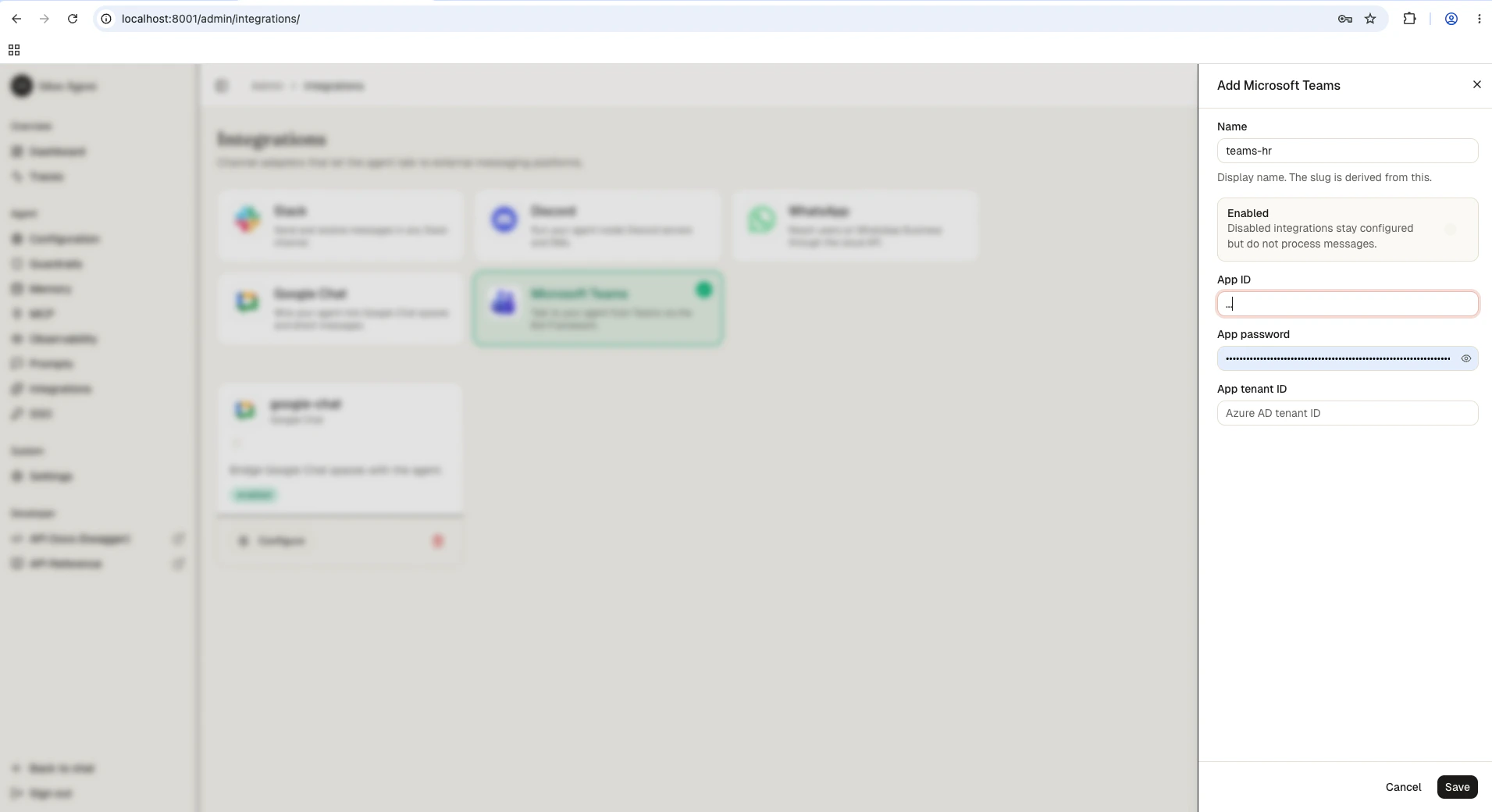
3
Save
Save the form. The reload pipeline registers the Teams webhook handler on the running engine; the agent now responds to messages forwarded by the Bot Framework.
How it works
- User sends a message in Teams (DM or @mention in a channel)
- Bot Framework POSTs the activity to your engine’s
/integrations/teams/messageswebhook - The engine validates the Bot Framework signature against the configured tenant + app credentials
- The engine invokes the agent with the message text
- The engine sends the agent’s reply back through the Bot Framework adapter
Next steps
Slack
Connect your agent to Slack DMs and channels.
Discord
Reach the same agent through Discord slash commands.
Production hardening
Secure the engine before exposing webhooks to the public internet.